
Unified Enrollment SDK v2
SDK v2 is the next major version of the Unified Enrollment SDK. The SDK reads a card's first digits and picks the route from the card's program and from who is on the page: a finance admin or an employee. An admin's session starts on the card number; an employee's session starts on the card form when card enrollment is on.
At the end of this page you will have a v2 page running in sandbox, each route driven with a test card, the scopes your SDK client needs, and the events your code handles. The reference tables (options, events, scopes) are at the end.
v2 is served from its own path. /unified/v1/ keeps serving v1, so you move one page at a time by changing one script src, and a page can stay on v1 for as long as it needs:
<!-- v1, unchanged -->
<script src="https://sdk.astrada.co/unified/v1/unifiedEnrollmentSdk.js"></script>
<!-- v2 -->
<script src="https://sdk.astrada.co/unified/v2/unifiedEnrollmentSdk.js"></script>
The UnifiedEnrollmentSdk global (open, close, setStyle), the iframe and the overlay are the same in both versions. Every v1 setStyle variable works in v2. For colors:
- v2 has no step progress bar, so
--progress-bar-colorcolors the bank step's spinner, and--progress-track-colorcolors its track and the hover behind the header's back button. - v2 adds
--btn-primary-color, the text color on primary buttons. When that text would fall under a 4.5:1 contrast ratio on--btn-primary-bg-color, v2 darkens the background until it passes and logs the color it applied. - Secondary buttons are outlined:
--btn-secondary-colorcolors their border and label, with no fill. When it falls under 4.5:1 on the white card, v2 darkens it the same way and logs the color it applied.
Load one version per pageNever put the v1 and v2 script tags on the same page. The loader looks for a
/unified/v1/tag first, so a page with both opens the v1 screens.
How a session runs
Your page calls open(). The SDK fetches a token from your backend, reads the subaccount's enrollment policy, routes the card from its first digits, and streams what happens to onEvent. Your backend hears about every card through the cardsubscription.created webhook, whichever route the card took.
sequenceDiagram
    autonumber
    participant P as Your page (SDK iframe)
    participant B as Your backend
    participant A as Astrada API
    participant N as Bank or network
    P->>B: getAccessToken()
    B-->>P: SDK client token
    P->>A: GET /subaccounts/{id} (enrollment policy)
    P->>A: POST /enrollment-methods + GET /bin-lookup (first 8 to 11 digits), GET /network-bulk-enrollments/open (admin, bulk on)
    A-->>P: single decision, program grade, network, issuer
    Note over P: route-decided
    alt Visa or Mastercard, single card
        P->>A: POST /card-subscriptions with the consent record, then 3DS steps
        A->>N: 3DS verification
        Note over P: card-enrolled
    else American Express
        P->>A: POST /bank-links
        P->>N: Plaid window: sign in at Amex
        P->>A: GET /bank-links/{id} until completed
        Note over P: bank-linked, card-enrolled (bank-feed)
    else Bulk-capable program (admin page)
        P->>A: POST /network-bulk-enrollments
        Note over P: bulk-enrollment-requested
    end
    Note over P: closed, then onSuccess
    A-->>B: cardsubscription.created webhook per card
Try it in sandbox
Sandbox is the same SDK against the sandbox API, so getAccessToken must return a token minted with your sandbox credentials.
-
Ask your Astrada contact to add
network-bulk-enrollments:writeto your sandbox SDK client, the OAuth client whose tokens your backend passes to the SDK. Tokens minted after that carry it. Without it, the bulk kickoff and the confirm request answer403(see Token scopes). -
Create a test subaccount with Visa and Mastercard in its
configurations, as in Testing Single Card Enrollment. -
Set its verification policy and its rails. This call puts the subaccount in sandbox mode (its bank links go to Plaid Sandbox), lets frictionless test cards verify without a challenge, and sets policy A from the table below:
PATCH /subaccounts/{subaccountId} HTTP/1.1
Authorization: Bearer YOUR_ACCESS_TOKEN
Content-Type: application/json

{
  "verificationPolicy": {
    "sandbox": true,
    "stripeValidationLevel": "MEDIUM"
  },
  "enrollmentPolicy": {
    "cardEnrollment": true,
    "bankEnrollment": "amex-only",
    "bulkEnrollment": "suggested"
  }
}
curl -X PATCH https://api.sandbox.astrada.co/subaccounts/{subaccountId} \ -H "Authorization: Bearer YOUR_ACCESS_TOKEN" \ -H "Content-Type: application/json" \ -d '{ "verificationPolicy": { "sandbox": true, "stripeValidationLevel": "MEDIUM" }, "enrollmentPolicy": { "cardEnrollment": true, "bankEnrollment": "amex-only", "bulkEnrollment": "suggested" } }'What happens next: the subaccount's
enrollmentPolicywins field by field over whatopen()passes (see Choose your rails), so set all three rail fields here. Allow up to 60 seconds before you open a bank link (see Bank linking in sandbox).MEDIUMis explained in Verification Risk Tiers. -
Load v2 from the sandbox host and open a session.
personais required:"admin"on a card admin's page,"cardholder"on an employee page.<script type="text/javascript" src="https://sdk.sandbox.astrada.co/unified/v2/unifiedEnrollmentSdk.js" data-id="unified-enrollment-sdk" ></script> <script> UnifiedEnrollmentSdk.open({ subaccountId: "<sandbox subaccountId>", companyName: "Your company", getAccessToken: () => fetch("/your-backend/astrada-sandbox-token").then((r) => r.text()), persona: "admin", // "cardholder" on employee pages onEvent: (event) => console.log(event), onSuccess: (result) => console.log(result.summary), }); </script>Where the tags go: inside
<body>, or callopen()once the page has loaded. The SDK attaches todocument.body, so a call that runs in<head>opens nothing and logs aTypeError.What happens next:
open()resolvestrueonce the SDK is on the page, orfalsewhen it refused the config; the console then lists every field to fix.To try a session without writing a page, use the SDK playground. Its presets set
persona(the employee page uses"cardholder"; the finance admin presets use"admin") and the three rail options, and show theopen()call they produce. -
Drive each route with a test card. On an admin page, type the number on the card number screen and press Continue (it needs 8 digits). On an employee page, type it on the card form: the SDK routes the card once 8 digits are typed.
The tests use three subaccount policies; switch between them with the same
PATCH:Policy enrollmentPolicyA card true, bank"amex-only", bulk"suggested"B card true, bank"off", bulk"suggested"C card true, bank"off", bulk"off"Type this (policy, page) What you see routeinroute-decidedAny number starting 34or37(B, admin)The program screen for an American Express program. Connect all company cards opens the kickoff form, which ends on "Request sent" or "Next: write to your bank" and sends bulk-enrollment-requested.amex-kickoff5555 5511, then Continue (A, admin)The program screen with Connect all company cards and This doesn't look right. The kickoff ends on "Request sent" or "Next: write to your bank", with Connect this card now. proven-single5555 5522, then Continue (A, admin)The callout "You may be able to connect all your cards at once", with Ask Astrada to check and Connect this card now. Sending the request fires bulk-confirmation-requested.high-singleAny number starting 34or37(A, admin or employee)The Amex bank screen (on an employee page, once the card form has the first 8 digits), then the Plaid window (First Platypus Bank in sandbox). Sign in with user_good/pass_goodand pick the credit card account. You getbank-linked, thencard-enrolledwithenrollmentType: "bank-feed".amex-bank4242 4242 4242 4242, expiry12/34, CVC123(A, admin or employee)On an admin page, the card form with the first digits filled in; on an employee page, the card form you are typing in stays open. The card verifies without a challenge and sends card-enrolled.card-only(admin),cardholder-card(employee)5555 5525 0000 1001, any future expiry, CVC123(A, admin)The card form, a 3DS challenge, then success and card-enrolled.card-onlyAny number starting 34or37(C, admin)"This card can't be connected here". amex-not-eligibleAny number starting 34or37(B or C, employee)Once the card form has the first 8 digits, "Your company connects this card", and company-connection-needed.cardholder-company-connectsAbout the kickoff rows: the kickoff ends on "Request sent" when Astrada contacts the bank, or on "Next: write to your bank" when the admin contacts it. Once your account has a kickoff open for the program,
5555 5511opens "Already under way" instead.5555 5511and5555 5522exist only to show these screens in sandbox. They are not full test cards, so a card started from them can't finish the card form: sandbox enrolls only the published test cards. In sandbox, kickoffs and confirm requests never reach a bank or a card network. -
Run it again. Each test card enrolls once per subaccount: enrolling it again reports the existing card with
alreadyEnrolled: true. For a fresh run, delete the subaccount and create another.
Using it in React (TypeScript)
The runtime is the hosted script; the types are a separate package, @astrada.co/card-enrollment-sdk, whose ./unified entry types window.UnifiedEnrollmentSdk, the config and every payload. Install it as a dev dependency:
npm install --save-dev @astrada.co/card-enrollment-sdk@^2.1.0
Check the versionSDK v2 needs version 2.1.0 of the types or later (
personarequired,open()resolving a boolean,bulk-reference-enteredin place offeed-created,logo, andsingleDecisionReasononroute-decided). Versions 1.x type SDK v1. Check withnpm view @astrada.co/card-enrollment-sdk versionbefore you install.
This component loads the SDK, opens a typed session, narrows each onEvent payload by event.type, and closes the session when it unmounts:
import { useEffect } from "react";
import type {
  EnrollmentSuccess,
  SdkErrorEvent,
  SdkEvent,
  UnifiedEnrollmentSdkConfig,
} from "@astrada.co/card-enrollment-sdk/unified";

// Sandbox while you test; production is https://sdk.astrada.co/unified/v2/unifiedEnrollmentSdk.js
const SDK_SRC = "https://sdk.sandbox.astrada.co/unified/v2/unifiedEnrollmentSdk.js";

// Loads the script once; the loader defines window.UnifiedEnrollmentSdk. The
// promise is cached at module level, so two components mounting at once (or
// React StrictMode's mount, unmount, mount in development) add one tag.
let sdkLoad: Promise<void> | undefined;
function loadSdk(): Promise<void> {
  sdkLoad ??= new Promise((resolve, reject) => {
    if (window.UnifiedEnrollmentSdk) return resolve();
    const script = document.createElement("script");
    script.src = SDK_SRC;
    // The loader finds its own tag by src; data-id only matches the HTML snippets above.
    script.dataset.id = "unified-enrollment-sdk";
    script.onload = () => resolve();
    script.onerror = () => {
      script.remove();
      sdkLoad = undefined; // let the next mount try again
      reject(new Error("The Unified Enrollment SDK did not load"));
    };
    document.head.appendChild(script);
  });
  return sdkLoad;
}

export function ConnectCards({ subaccountId }: { subaccountId: string }) {
  useEffect(() => {
    let unmounted = false;
    let opened = false; // close() on unmount only for a session this component opened

    const config: UnifiedEnrollmentSdkConfig = {
      subaccountId,
      companyName: "Your company",
      persona: "admin", // "cardholder" on an employee page
      getAccessToken: () => fetch("/your-backend/astrada-token").then((r) => r.text()),
      onEvent: (event: SdkEvent) => {
        // event.type narrows the union: each branch sees only its own fields.
        switch (event.type) {
          case "route-decided":
            console.log(event.route, event.bin6);
            break;
          case "card-enrolled":
            console.log(event.cardId, event.enrollmentType, event.last4);
            break;
          case "bank-linked":
            console.log(event.bankLinkId, event.bankAccounts.map((account) => account.id));
            break;
          case "bulk-enrollment-requested":
            console.log(event.enrollmentId, event.alreadyRequested ?? false);
            break;
          case "closed":
            if (event.next === "invite-team") console.log("open your invite page", event.teamLink?.url);
            break;
        }
      },
      onSuccess: (result: EnrollmentSuccess) => {
        for (const card of Object.values(result.cards)) console.log(card.cardId, card.subscriptionId);
      },
      onError: (error: SdkErrorEvent) => console.error(error.flow, error.code, error.message),
      onCancel: () => console.log("nothing enrolled"),
    };

    loadSdk()
      .then(() => (unmounted ? undefined : window.UnifiedEnrollmentSdk.open(config)))
      .then((result) => {
        if (result === false) console.error("The SDK refused the config; the console lists each field.");
        if (result === true) opened = true;
      })
      .catch((error: unknown) => console.error(error)); // the script did not load: show your own retry

    return () => {
      unmounted = true;
      if (opened) window.UnifiedEnrollmentSdk?.close();
    };
  }, [subaccountId]);

  return null; // the SDK renders its own overlay; pass `container` to render inline instead
}
What happens next: open() tears down any session already open before it opens a new one, so re-rendering with another subaccountId is safe. A session your page ends with close() still gets its one onSuccess (built from the events delivered so far) or onCancel.
What users see in v2
- An admin session starts on the card number. On an admin page the user types the first 8 to 11 digits on the card number screen and the SDK picks the route from them.
- The full card number is typed only on the card form, which on an admin page opens with those digits filled in. An employee page with card enrollment on opens on the card form itself (below).
- Every number starting with 3 stops at 8 digits on the card form, so a full American Express number is never typed into it.
- The welcome screen, the chooser and the v1 bulk screens are gone.
reconnectandresumesessions still open on their own steps.
- Admin pages route each card by its program (
persona: "admin"):- A program Astrada has bulk-enrolled before opens the program screen, where the only way on is the bulk kickoff.
- When your account already has an open kickoff for the program (from an earlier session or a colleague), the SDK finds it while it looks the card up and opens "Already under way", with the day it was asked for, instead of the program screen and the form ("All cards like this one are already set up" once the program's feed is registered).
- That kickoff counts as the session's completed action, so closing the SDK then calls
onSuccess, notonCancel. - When the card can also enroll on its own and bulk is not forced, the kickoff's last screen ("Request sent", or "Next: write to your bank" when the admin contacts the bank) offers Connect this card now, which opens the card form with the digits filled in.
- A program that is likely bulk-capable gets the callout "You may be able to connect all your cards at once", with Ask Astrada to check and Connect this card now.
- Once the request is sent, a card that can enroll on its own goes to the card form, which says Astrada will email the admin; any other card ends on "Request sent".
- An open kickoff for the program replaces this callout with "Already under way" too.
- An American Express card goes to its bank link when bank linking serves Amex, whatever its program, otherwise to the bulk kickoff when bulk is on, and otherwise to "This card can't be connected here".
- The SDK treats any number starting with 3 as American Express, so a Diners Club (30, 36, 38) or JCB (35) card takes this route too.
- See Bank Linking for the Amex bank step in detail.
- Any other card goes to the bank link, the card form or "This card can't be connected here", as the account's settings allow.
- A card whose program the lookup couldn't grade (for example while live card data is temporarily unavailable) is treated as not bulk: it goes to the bank link, the card form or "This card can't be connected here", on a page with bulk
"forced"too.
- A program Astrada has bulk-enrolled before opens the program screen, where the only way on is the bulk kickoff.
- Each program's kickoff or confirm request is sent once per session. Another card of the same program (same first 8 digits and network) shows the program screen with the bulk enrollment underway and Connect this card now, or the callout with "Request sent".
- Employee pages never show bulk. With
persona: "cardholder", the SDK enrolls the user's own card.- With card enrollment on, the page opens on the card form, empty, with no card number screen before it. Once 8 digits are typed, the SDK looks the card up and routes it: the form stays open for a card it can connect, and moves to the card's bank step or ending otherwise.
- Try a different card and Back return to an empty card form.
- With card enrollment off, the page opens on the card number screen, as an admin page does.
- An Amex card goes to the same Amex bank link, where the employee signs in to their own Amex account, when that bank link can take it; otherwise the employee sees "Your company connects this card". A Diners Club or JCB card, starting with 3, goes the same way.
- Each bank connection an employee makes is a card of its own, so connecting the same Amex again gives a second card.
- To repair a connection whose bank account reads
auth_required, open the SDK withreconnect: { bankAccountId }instead.
- The endings say what is connected. A card's ending says the card is connected, with no promise about when its purchases show up; a bank ending says its activity shows up once the bank posts it. An admin's endings say their team connects their own company cards, above Invite your team.
- Enrolling one card never blocks bulk later. A Visa or Mastercard card enrolled on its own moves into the company's bulk feed by itself once the feed starts in the same subaccount, and the kickoff and confirm-request forms say so.
- The reference step takes a reference, not a Visa rail. In a
resumesession the admin enters the bank's reference: for Visa an RPIC (four numbers joined by underscores) or a PIC (three), digits only; for American Express a Recipient ID (R plus digits) or a 6-digit Company ID; for Mastercard a Delivery ID.
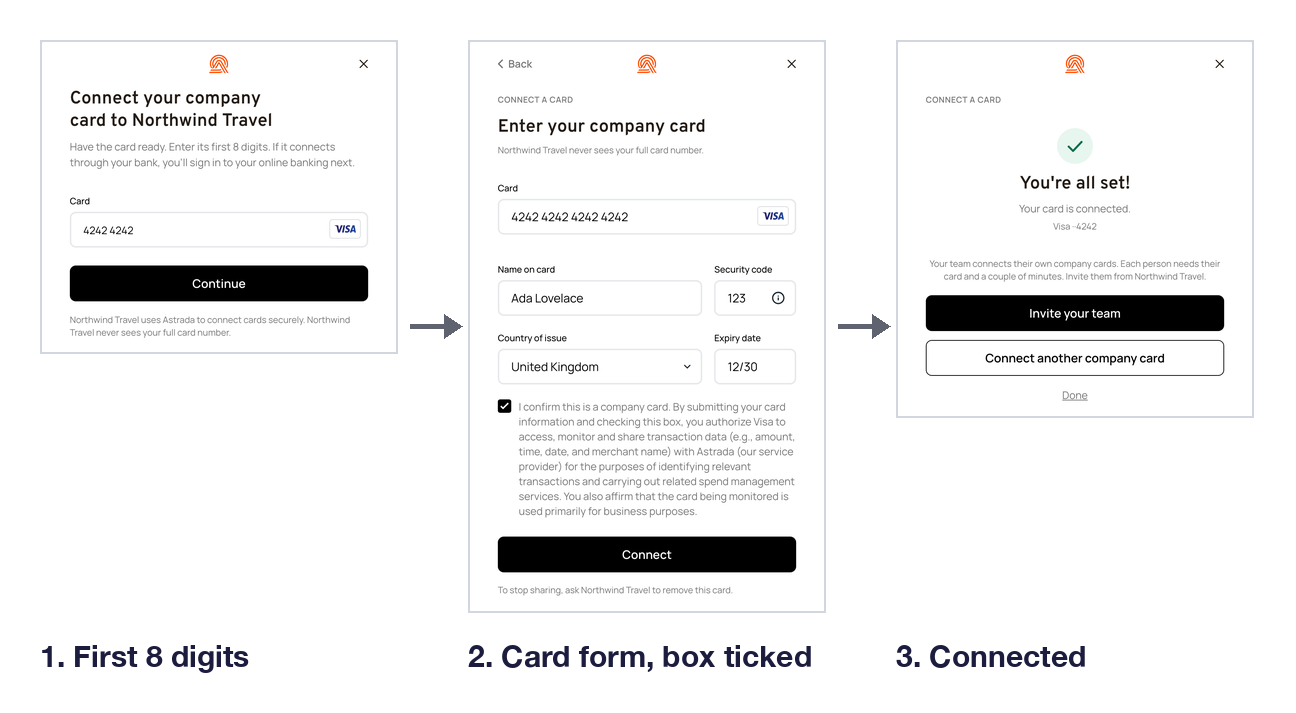
Admin page.
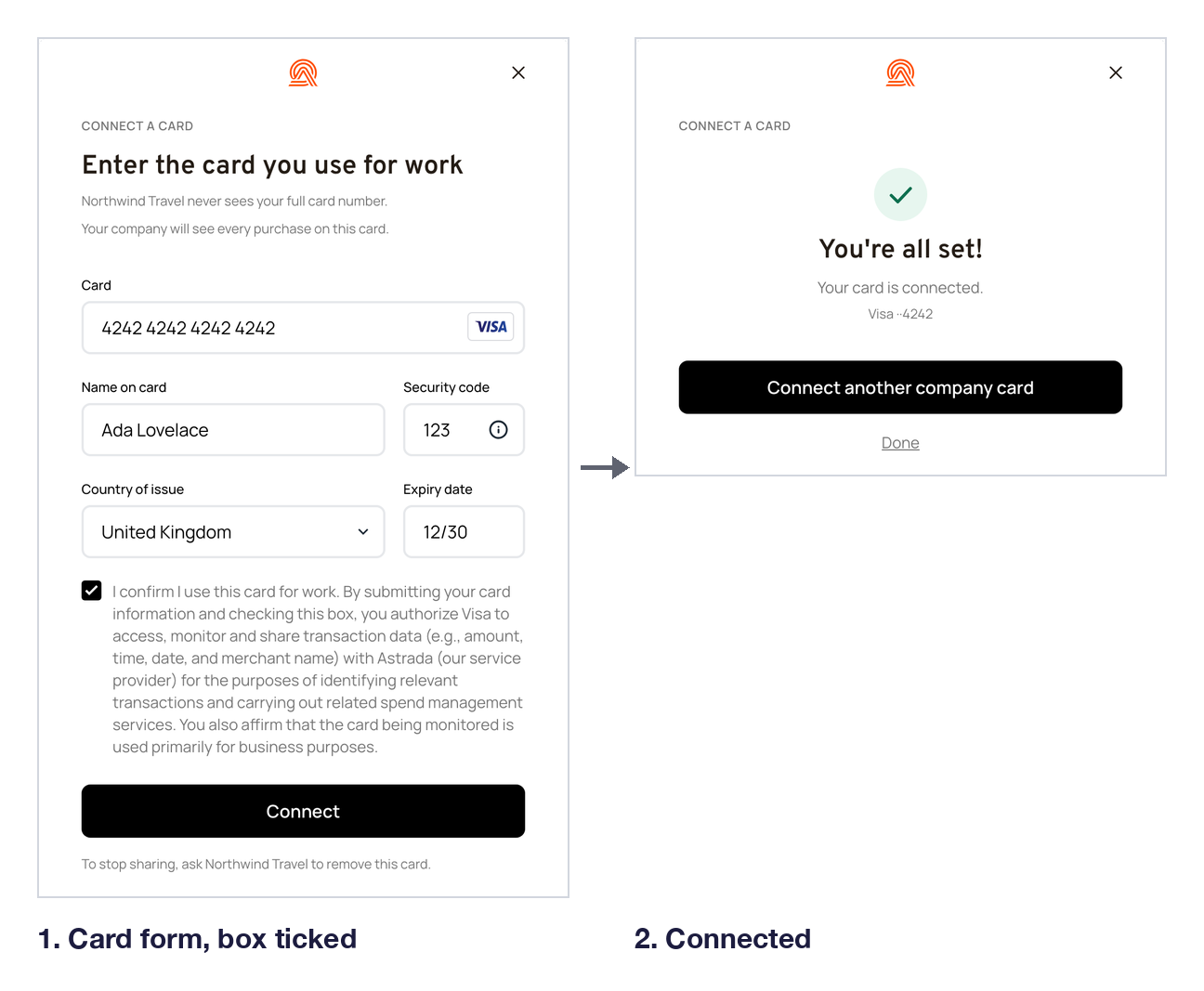
Employee page.
Consent and the terms box
The SDK sends the consent record with each card enrollment, including from hosted enrollment link pages, so you write no code for it. What it shows on a consent error and what it records: The consent record.
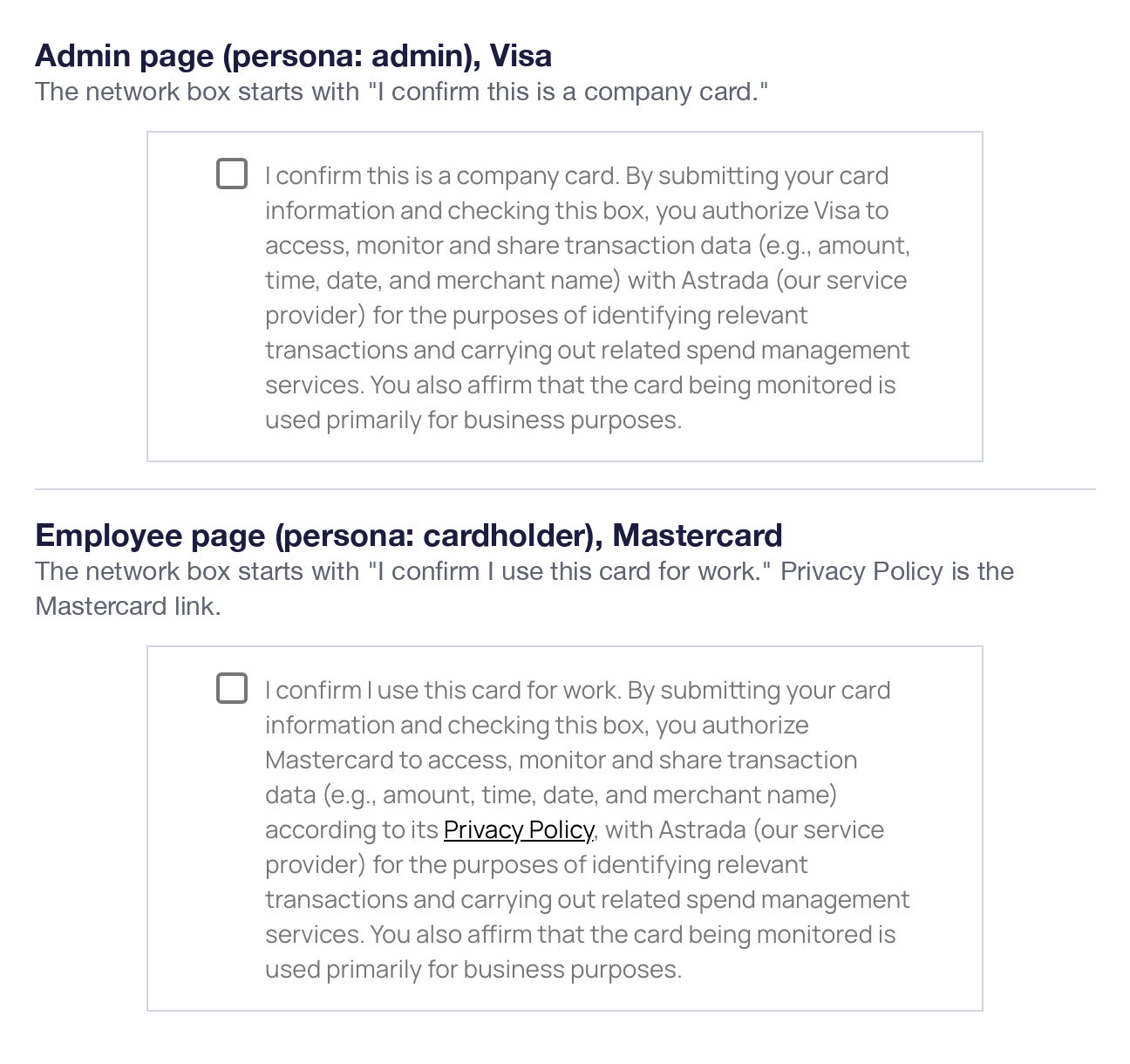
Admin and employee pages open the network box with different sentences.
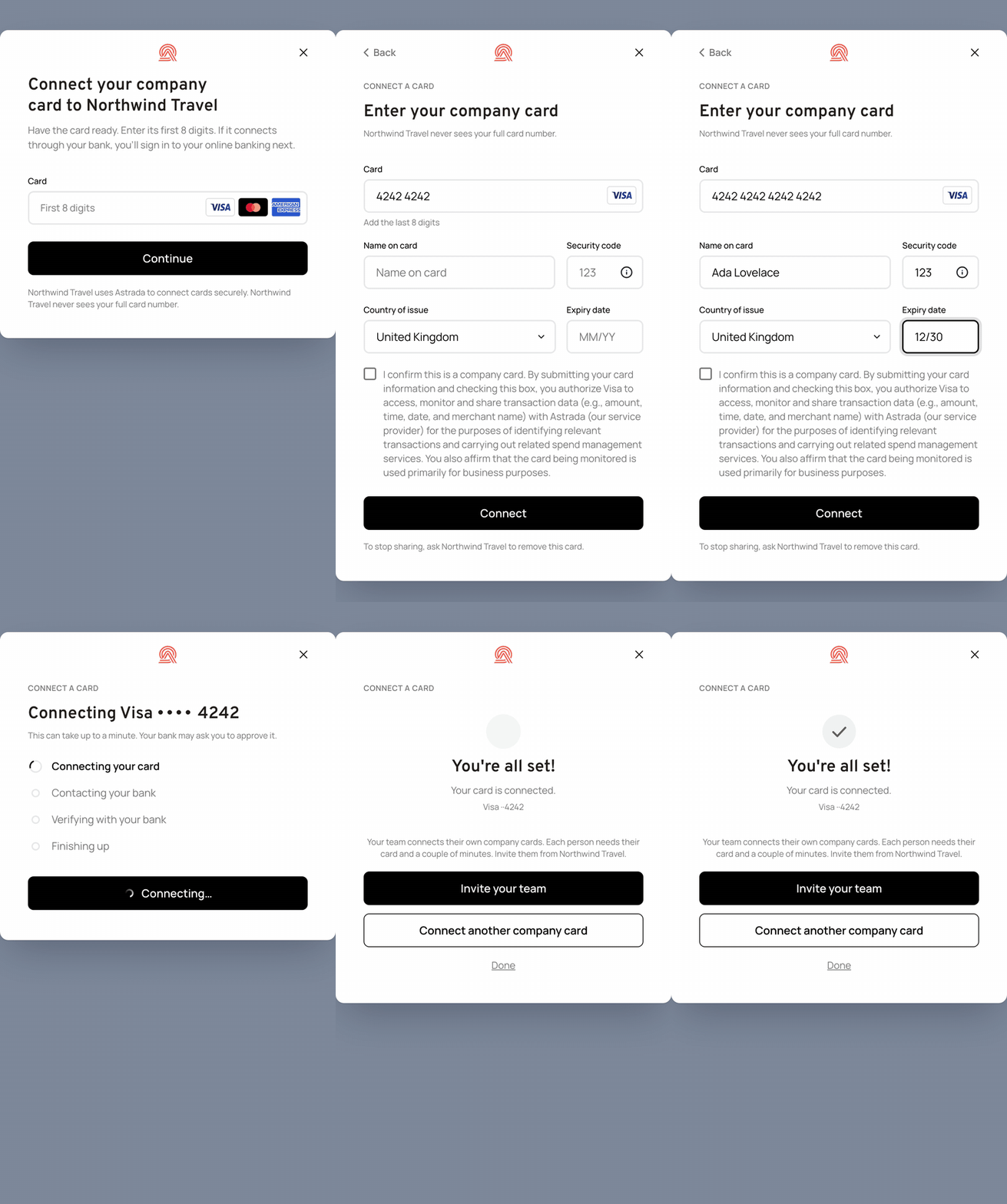
Tick, connect, success (16 s).
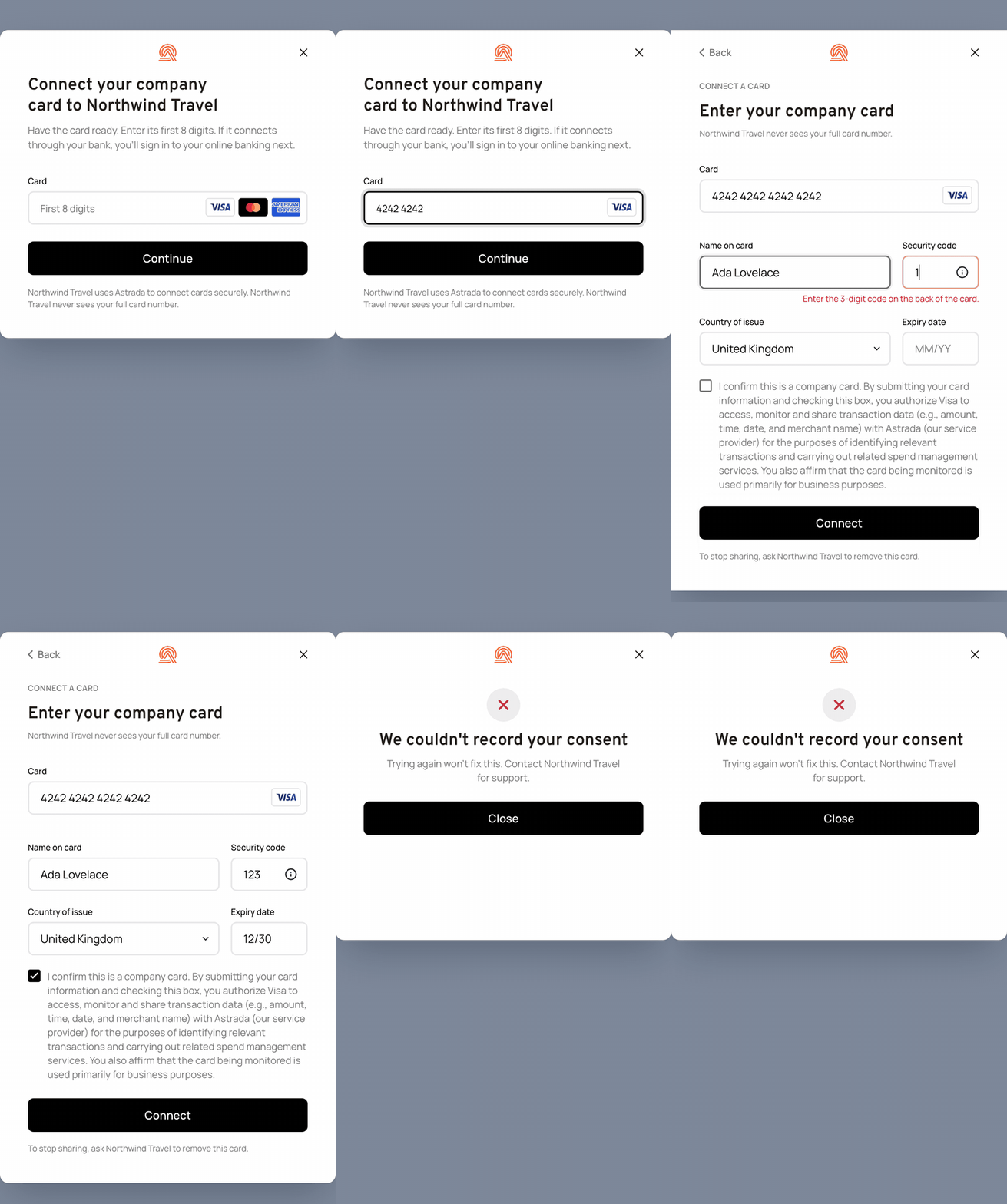
A consent refusal (13 s).
Enrollment links and hosted pages
An enrollment link lets people connect their own cards on a page Astrada hosts, so you need no SDK page of your own for them. A link opens one subaccount, and every card enrolled through it joins that subaccount. Astrada switches enrollment links on per account; until then the endpoints below answer 409 with ENROLLMENT_LINKS_NOT_ENABLED.
Your backend creates the link and hears what was enrolled:
sequenceDiagram
    autonumber
    participant B as Your backend
    participant A as Astrada API
    participant E as Employee
    B->>A: POST /enrollment-links {subaccountId, kind}
    A-->>B: 201 {id, url}, the only copy of the secret
    B->>E: Send the url
    Note over E: Uses the link (next diagram)
    A-->>B: cardsubscription.created webhook
    B->>A: GET /enrollment-links/{id}
The person uses the link on the hosted page:
sequenceDiagram
    autonumber
    participant E as Employee
    participant H as Hosted page
    participant A as Astrada API
    E->>H: Opens the link (enroll.html)
    H->>A: POST /enrollment-link-sessions/preview
    A-->>H: Platform, employer, brand
    E->>H: Get started (team link: Turnstile)
    H->>A: POST /enrollment-link-sessions
    A-->>H: Session, 300 s card token
    E->>H: Ticks consent box, submits card
    H->>A: Card enrollment calls, with consent
    H->>A: POST /enrollment-link-sessions/complete
There are two kinds of link:
- Personal link. One link for one employee.
- Your backend creates it with
POST /enrollment-links,kind: "cardholder"and your API client. ThecustomerReferenceIdyou send (a UUID, such as the employee it is for) is carried by every card enrolled through the link. - A personal link is used up by the first session that completes something, and allows at most 5 session starts before that.
- It expires after 7 days unless you set
expiresInHours.
- Your backend creates it with
- Team link. One link to share with a team.
- Your backend creates it with
POST /enrollment-linksandkind: "team"(14 days and 50 session starts by default,maxUsesup to 500), or the SDK creates it withPOST /subaccounts/{subaccountId}/team-linkwhen an admin presses Invite your team on an ending: the admin sees a link to copy. - A session that ends from Invite your team always ends with
next: "invite-team"ononSuccessand on theclosedevent: right away when enrollment links are off for the account, from Done on the link screen, or when the link can't be made.teamLink({ id, url, expiresAt }) comes with it only when a link was made. - A page with
bulkEnrollment: "forced"never offers Invite your team.
- Your backend creates it with
What the person sees
Link pages carry card enrollment only: no bulk enrollment and no bank step. A person who opens a working link goes through these screens:
- The start page. The link opens
enroll.htmlunder/unified/v2/on the SDK host (sdk.astrada.co, orsdk.sandbox.astrada.coin sandbox), with the link's secret after#. The page strips the secret from the address before it makes any request.- It names your platform and the employer from the link's
platformNameandorganizationName; once Astrada has set a brand profile for your account, it shows your name, accent color and logo instead of the plain Astrada header. The brand shows once, in the page header. - The consent text is Astrada's.
- It names your platform and the employer from the link's
- Get started. The person presses Get started. A team link also asks the person to pass a Cloudflare Turnstile check first.
- The card form. The page runs the SDK as an employee page (
persona: "cardholder") for the link's subaccount, so it opens on the card form. The card form's heading is the page's only heading. Because a link cannot pass terms, the card form shows only the network consent box. - "You're done". The page's "You're done" is its one ending: the SDK's success screen closes as it opens, because a link session never offers Connect another company card and the screen has nothing but Done.
When a link can't be used, the page says so:
- A used, revoked or expired link shows "This link no longer works", and the line below it says why: "This link has expired.", "This link was already used." or "This link was turned off.", then who to ask for a new one.
- A session whose page has ended shows "This page has expired" and "Open your link again to continue."
- When the server gives no reason, the line is "It has expired or was already used. Ask your company for a new one."
- A link made before card enrollment was turned off on its subaccount starts no session while card enrollment stays off:
POST /enrollment-link-sessions/previewandPOST /enrollment-link-sessionsanswer409withCARD_ENROLLMENT_OFF, no start is counted, and the start page shows "This link can't be used yet" in place of Get started.
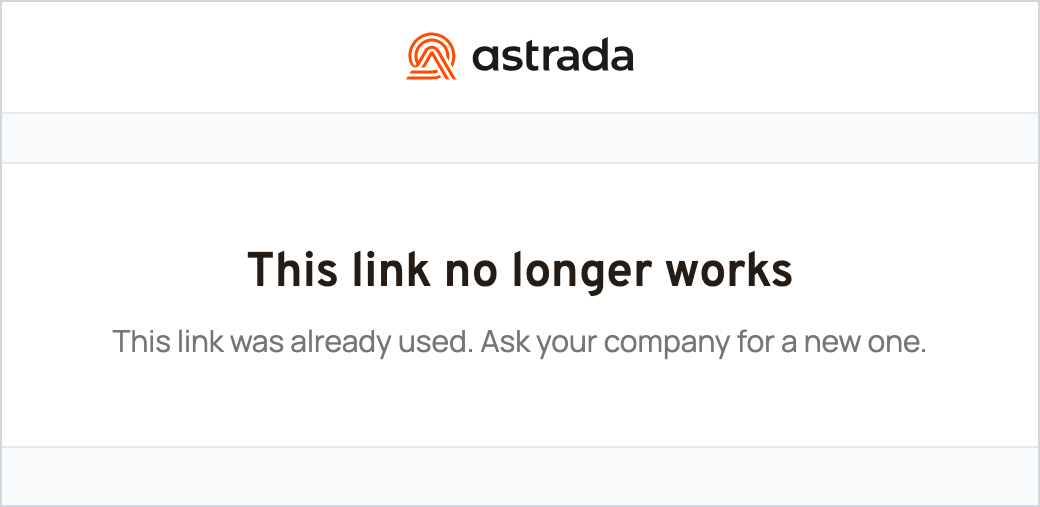
Used link.
Before you create links
POST /enrollment-linksneedssubaccounts:write, so call it from your backend with your API client, never from a browser token.POST /subaccounts/{subaccountId}/team-linktakes the SDK token'scard-subscriptions:write, or an API client'ssubaccounts:write.- Both calls answer
409withCARD_ENROLLMENT_OFFwhen card enrollment is off on the subaccount (enrollmentPolicy.cardEnrollmentisfalse), because the hosted page has nothing else to offer. - Both calls answer
429withRATE_LIMITEDonce your account has created 2,000 links in a UTC day, team links included.POST /subaccounts/{subaccountId}/team-linkalso stops at 20 links a day for one subaccount. POST /subaccounts/{subaccountId}/team-linkmakes a new link on every call. A new link does not revoke an older one, so a link an admin already shared keeps working when they press Invite your team again. Each link ends at its own expiry, when its session starts are used up, or when it is revoked.- The response's
urlis the only place the secret is returned. Store or send it then; later reads such asGET /enrollment-links/{linkId}do not show it.POST /enrollment-links/{linkId}/revokeends a link. - A session lasts 60 minutes;
GET /enrollment-links/{linkId}lists each session with the ids the page reported. Thecardsubscriptionwebhooks stay the source of truth for what was enrolled.
Options
open() checks every option before it opens anything. A value it refuses logs an error naming the field, and open() resolves false and opens nothing; an option it ignores or a value it adjusts logs a warning, and the session opens.
| Option | In v2 |
|---|---|
persona | New, and required. "admin" or "cardholder". Set it from who is on the page; the SDK never asks. A missing or other value is refused. |
locale | New. The language of the screens, as a BCP 47 tag such as "en-GB"; the language part decides. The screens are in English. sv-SE is available on request; contact Astrada. |
prefill | New. Optional. { companyLegalName?, adminName?, adminEmail?, bankContactName?, bankContactEmail? }, all strings. Fills in the bulk kickoff form and the confirm-request form with details your page already knows. |
logo | New. { pngBase64 }: your logo beside Astrada's mark at the top of the card, on every screen, 28 pixels tall. Without it, Astrada's mark shows alone. |
entry | Ignored, with a warning whatever its value; there is no chooser. |
bulkFlow | Ignored, with a warning whatever its value. The kickoff is the only bulk flow (resume still opens the reference step). |
minBinDigits | Now 8 to 11 (default 8), and always used: it sets how many digits Continue needs on the card number screen. v1 took 6 to 16, and only with card enrollment off. Values outside the range are clamped, with a warning. |
bulkEnrollment | Same values. "suggested" and "forced" act through the program screen and the callout; "forced" drops Connect this card now. |
bankEnrollment | Same values. "on" no longer adds a chooser tile: the bank link is a route after the card number, on admin pages, and on employee pages for an Amex card. |
linkAnotherCard | Same type. It shows or hides Connect another company card on the card success screen, which starts again on the page's first screen: the card number screen on an admin page, the empty card form on an employee page. |
bankLink | Same shape. When the page sends no countryCode, v2 sends the card issuer's country. An unknown field or a bad value is refused. |
maxWidth | Same type, now at least 360 pixels: a smaller number becomes 360 with a warning. |
getAccessTokenTimeoutMs | Same meaning. The enrollment window waits for it too, so a slow token gets the time you set. It must be a positive number; anything else is refused. |
resume | Same shape. On a cardholder page it is ignored with a warning, and the session opens as any session on that page does. An unknown field is refused. |
reconnect | Same shape. An unknown field is refused. |
statusLabels | Same shape. An unknown stage, or a label that is not a string, is refused. |
customerReferenceId | Same meaning, and it must be a UUID: the API takes a UUID only, so anything else is refused. |
terms | Same shape. text renders as text, where a Markdown link becomes a link, and links open only for https, http and mailto URLs. Without terms, the form shows no terms box (see Consent and the terms box). |
metadata | Still reserved. v2 logs a warning that it does nothing, whatever its value, and sends it nowhere. |
More on locale, prefill, logo, bulkEnrollment, linkAnotherCard and terms:
locale: without a supportedlocalethe screens are in English, whatever language the browser prefers. Another language shows English, with a warning. The hosted link pages take nolocaleand are in English.prefill: the admin sees each value and can change it, and nothing is sent until they submit. An unknown field or a non-string value is refused.logo:pngBase64is the bytes of a PNG file in base64, with nodata:prefix and never a URL, at most 512 x 512 pixels and 32 KB. Anything else is refused, and the error says why.bulkEnrollment: the v1trueorfalsestill works, with a warning naming what it sets:trueis bulk"suggested"with the bank step"on";falseis bulk"off"with the bank step"amex-only";- and both turn the card form on, except for a
cardEnrollmentorbankEnrollmentyou pass yourself.
linkAnotherCard: a hosted link session never shows it, whatever this is set to.terms: a non-stringtext, a javascript:, data: or vbscript: URL, or an unknown field is refused.
Unchanged: subaccountId, companyName, getAccessToken, container, cardEnrollment, and the five callbacks.
An employee page sets persona: "cardholder":
UnifiedEnrollmentSdk.open({
  subaccountId: "<subaccountId>",
  companyName: "Your company",
  getAccessToken,
  persona: "cardholder",
});
Which value wins: subaccount policy or open() option
open() optionEach rail has a server field on the subaccount's enrollmentPolicy and an option in open(). The SDK picks one field at a time, in this order: the subaccount's value, then the account's value, then the open() option, then the default.
| Setting | Server field (PATCH /subaccounts/{subaccountId}) | open() option | Default | Who wins |
|---|---|---|---|---|
| Card form | enrollmentPolicy.cardEnrollment | cardEnrollment | true | The subaccount, then the account, then open() |
| Bank link | enrollmentPolicy.bankEnrollment | bankEnrollment | "off" | The subaccount, then the account, then open() |
| Bulk | enrollmentPolicy.bulkEnrollment | bulkEnrollment | "off" | The subaccount, then the account, then open() |
| Connect another company card | Not set through PATCH (Astrada manages it; the subaccount read shows the effective value) | linkAnotherCard | true | false on either side hides the button; nothing can turn it on against false |
A rail the subaccount leaves unset (or clears with null) takes the account's value when there is one, then your open() option. Two exceptions to the order:
- While Astrada has locked the account's bank link value (
bankEnrollmentLocked: trueon the subaccount read, read-only), that value applies whatever the subaccount oropen()says. - An account
bankEnrollmentof"amex-visa"applies to every subaccount the same way.
route-decided reports where each field came from in provenance. When a rail's stored value and your open() option disagree, the SDK uses the stored value and logs a console warning, once per page load, that names each such rail with both values.
A policy change reaches the next session you open. If the same tab ran the SDK in the last 5 minutes, that session can start from the policy it read then; the new policy takes over on the card-number screen (on an employee page, the card form while nothing is typed in it), and a session already past that screen switches when it gets back there.
Events and callbacks
onCancel and onError are called the same way as in v1. onSuccess gets the v1 payload:
- without
bulkFeedsandsummary.feedsCreated(v2 registers no feed); - plus
bulkReferences; - plus
next: "invite-team"whenever the session ends from Invite your team (the valueclosed.nextcarries, so a page that only handlesonSuccesslearns it too); - plus
teamLinkonly when the admin made a team link there.
Everything else reaches onEvent only. The names below are the type values of the SdkEvent union in the types package.
| Event | In v2 |
|---|---|
card-enrolled, bank-linked, error | Unchanged. error gains fixed code values for the failures the SDK finds itself (invalid-config, access_token.failed, subaccount.not_found, subaccount.forbidden, subaccount.read_failed, enrollment_policy.empty, bank_link.create_failed, bank_link.timed_out, bank_link.wrong_institution, bank_account.not_found, network_bulk_enrollment.forbidden, network_bulk_confirmation.forbidden, resume-unavailable); the card form keeps its own codes. Branch on code, never on message. |
route-decided | New. { route, network?, persona, bin6, policy?, provenance?, reason?, singleDecisionReason? }, once per Continue on the card number screen (on an employee page that opens on the card form, once the 8th digit is typed there), and once more with the new route when a later screen re-routes the card (below the table). Only the card's first 6 digits are reported. |
company-connection-needed | New. { network, bin6 }, when an employee page gets an Amex card that its bank link can't take (below the table). The employee sees "Your company connects this card". |
bulk-confirmation-requested | New. The admin asked Astrada to confirm a likely bulk program: requestId, confirmationId, subaccountId, network, the issuer details (issuerName, issuerCountry, cardType, each omitted when unknown), companyLegalName, cardAdminEmail, and customerReferenceId when you set one. |
bin-disputed | New. { bin6, route }, when the admin presses This doesn't look right on the program screen. route is the one the screen showed. |
bulk-enrollment-requested | Adds cardCount, which is absent when the admin leaves the kickoff form's card count empty (the count is optional). It no longer needs bulkFlow: "kickoff". |
bulk-reference-entered | New. The end of a resume session: { networkBulkEnrollmentId, subaccountId, network, networkReference, feedType?, expectedCardCount? }. The SDK registers nothing; your backend sends these fields to POST /network-bulk-feeds with your API client (feedType goes as type). |
feed-created | Removed. The SDK creates no feed, so read bulk-reference-entered. |
closed | Adds next: "invite-team" whenever the session ends from Invite your team, the bulkReferences map, and summary.confirmationsRequested and summary.referencesEntered. It adds teamLink: { id, url, expiresAt } only when the admin made a team link this session. onSuccess carries the same next and teamLink. |
cancelled | Adds lastScreen, for example "card-entry" or "program". An employee page that opens on the card form reports "card-link" when it is closed before a card is typed. |
More on route-decided, company-connection-needed, bulk-confirmation-requested, bin-disputed and bulk-enrollment-requested:
route-decided: a later screen re-routes the card when- the bank link refuses the card's country, or refuses the link with
403BANK_ENROLLMENT_DISABLEDwhile Astrada has locked the account's bank link value; - a different card is typed over the routed one on the card form;
- the admin presses This doesn't look right on the program screen (this one follows
bin-disputed); - the admin presses This is a small business card on an American Express program screen, which sends the card to its refusal;
- or the server refuses a Visa on single enrollment.
- the bank link refuses the card's country, or refuses the link with
route-decidedfields:policyandprovenancecome on the session's first one and again when they change;reason("policy"or"card") comes on the not-eligible routes, andsingleDecisionReasonis described below the table.company-connection-needed: the bank link can't take the Amex card when bank linking is off for Amex, the card is debit or prepaid, or the bank link refused the card (its country, or the account's locked bank link value).bulk-confirmation-requested: when the program already has an open request, the event addsalreadyRequested: trueandconfirmationIdis that request's.bin-disputed: the SDK re-routes the same card as not bulk (the bank step, the card form or "This card can't be connected here"), and aroute-decidedwith the new route follows this event.bulk-enrollment-requested: when the program already has an open kickoff, the event carries that kickoff'senrollmentId,alreadyRequested: trueand itsstate, withoutoutreach,companyLegalName,cardAdminEmailor the card count. The SDK sends it the same way whether it finds the kickoff before the form (when the card is looked up) or when the form is sent.
On route-decided, singleDecisionReason is the reason Astrada gave for refusing the card single enrollment on the subaccount:
singleDecision.reasonfromPOST /enrollment-methods, for example"card-type"or"bank-enrollment-required";- or
"bank-enrollment-required"whenPOST /card-subscriptionsrefuses a Visa from the card form withreasonCode: "card_subscription.bank_enrollment_required", which re-routes the card.
It comes only when Astrada refused with a reason, and again when the same card is routed again. Expect "coverage" on many cards that can't enroll one at a time, such as an American Express card. It is a plain string: new values can appear without an SDK release.
A card whose program couldn't be graded gets one of the ordinary routes: the route type still lists unchecked-single, unchecked-bank and unchecked-confirm-only, marked deprecated, but they are never sent.
A confirm request and an entered reference count as completed actions, so onSuccess can fire with no card, bank account or kickoff: read summary. If your code switches over every event type, add the new ones and drop feed-created:
onEvent: (event) => {
  switch (event.type) {
    case "route-decided": // once per Continue (or at an employee card form's 8th digit), and again if a later screen re-routes the card
      console.log(event.route, event.persona, event.bin6);
      break;
    case "bulk-confirmation-requested": // Astrada emails event.cardAdminEmail once it has checked
      break;
    case "company-connection-needed": // an employee's Amex: let the finance admin know
      break;
    case "closed":
      if (event.next === "invite-team") openYourInvitePage();
      break;
  }
};
Token scopes
The SDK makes these calls with the token from getAccessToken:
| Call | When | Scope |
|---|---|---|
GET /subaccounts/{subaccountId} | Opening a session, to read the subaccount's enrollmentPolicy | subaccounts:read |
POST /enrollment-methods | Every card number | enrollment-methods:write |
GET /bin-lookup | Every card number | cards:read (optional: the SDK tolerates a 403) |
GET /network-bulk-enrollments/open | Every card number on admin pages with bulk on (new in v2) | network-bulk-enrollments:write or network-bulk-feeds:write |
POST /network-bulk-enrollments | Bulk kickoff | network-bulk-enrollments:write or network-bulk-feeds:write |
POST /network-bulk-confirmations | Ask Astrada to check (new in v2) | network-bulk-enrollments:write or network-bulk-feeds:write |
POST /subaccounts/{subaccountId}/team-link | Invite your team, with enrollment links on (new in v2) | card-subscriptions:write |
Bank links and card enrollment use the same calls and scopes as v1.
The POST /network-bulk-feeds call that follows bulk-reference-entered is not in this table. Your backend makes it with your API client, which needs network-bulk-feeds:write; the SDK token does not carry that scope.
SDK clients created before v2 don't carry network-bulk-enrollments:write. When you move to v2, Astrada adds it to your SDK client, in sandbox first and then in production. Tokens minted after that carry it. Without one of the two scopes above:
- The bulk kickoff and the confirm request answer
403, and the session sendsnetwork_bulk_enrollment.forbiddenornetwork_bulk_confirmation.forbidden. - The check for an open kickoff answers
403too; the SDK then shows the program screen as it would without the check, and sends no error.
Testing beyond the SDK
The SDK stops at enrollment. To test what your platform does next, carry on in sandbox:
- Transactions. Run a predefined transaction lifecycle against an enrolled card with
POST /simulate/transaction/scenario, or publish one message at a time withPOST /simulate/transactions. Both needsimulation:write, which sandbox clients have by default, andPOST /simulate/transactionsalso needscards:read. See Sandbox API Reference. - Webhooks. Register a webhook on the test subaccount, as in Testing Single Card Enrollment, to receive
cardsubscription.createdfor each card the SDK enrolls and the transaction events that follow. - Bulk feeds. To watch a feed deliver cards and transactions, create one with your API client and drive a synthetic ingestion, as in Testing Bulk Enrollment.
What your page's CSP must allow
If your page sends a Content Security Policy, allow the SDK host in two directives. The host is sdk.astrada.co in production and sdk.sandbox.astrada.co in sandbox.
| Directive | Value | Why |
|---|---|---|
script-src | https://sdk.astrada.co | The <script> tag that loads unifiedEnrollmentSdk.js. |
frame-src | https://sdk.astrada.co | The loader opens the card screens in an iframe whose src is on the same host as the script. |
Use https://sdk.sandbox.astrada.co in both rows while you test in sandbox.
For the rest of your policy:
- The loader needs no
style-srcorimg-srcrow: it sets the iframe's and its container's styles through script properties (iframe.style.x = ...) and creates only adivand aniframe, never a<style>element or an image. - It makes no network requests of its own. The only call it triggers from your page is your
getAccessTokenfunction, so yourconnect-srcmust allow wherever that function fetches the token (usually your own backend). - The calls to the Astrada API come from inside the iframe, under the iframe page's own policy, which is Astrada's and needs nothing from you. The same goes for the hosted enrollment pages: they are separate pages on the SDK host with their own policy.
Moving to production
Production loads v2 from:
<script
  type="text/javascript"
  src="https://sdk.astrada.co/unified/v2/unifiedEnrollmentSdk.js"
  data-id="unified-enrollment-sdk"
></script>
Move one page at a time. For each page:
- Run the page's routes in sandbox with the cards above, as the persona the page will use.
- Ask your Astrada contact to add
network-bulk-enrollments:writeto your production SDK client. Tokens minted after that carry it. - Point the script
srcat/unified/v2/and remove the v1 tag from that page. - Set
personaon every page:"cardholder"on employee pages,"admin"on card admin pages.open()refuses a config without it. - Remove
entryandbulkFlow(optional: v2 ignores them and logs a warning), and replace atrueorfalsebulkEnrollmentwith the rails you mean:truealso turns the bank step on for every network. - If you set
minBinDigits, keep it between 8 and 11. - Handle the new events you care about: at least
route-decided, and on admin pagesclosed.next(or thenextononSuccess).- An admin page's endings offer Invite your team unless bulk is
"forced", andnext: "invite-team"says the admin chose it: open your invite page; whenteamLinkcomes too, the admin already has a link to share. - If you switch over every event type, add the new ones and drop
feed-created.
- An admin page's endings offer Invite your team unless bulk is
- Optional: pass
prefillwith the company and admin details you already have, so the kickoff and confirm-request forms open filled in.
To move a page back, point its src at /unified/v1/ again.
Related
- Unified Enrollment SDK: the v1 guide, with the rails and the event payloads v2 keeps.
- Bank Linking: the bank step, with the American Express specifics.
- Sandbox Testing: the sandbox environment, tokens and cleanup.
- Test Cards & Sandbox Testing: every published test card and its outcome.
- Sandbox API Reference: the simulation endpoints.
Updated 41 minutes ago