
Unified Enrollment SDK
What you get
One embedded flow for every way a card gets enrolled. The Unified Enrollment SDK drops a single script on your page and handles all three Astrada enrollment rails behind one integration:
- Card number. The cardholder types their card and 3DS verification activates it (Visa, Mastercard).
- Bank connection. The cardholder signs in to the bank behind their card through a bank-linking provider (Plaid or Mastercard Open Finance), and completion enrolls each credit account as a card (American Express).
- Network bulk feed. A whole card program is registered from network data (Visa, Mastercard, and eligible American Express corporate programs).
The SDK reads the card's first digits and routes to the right rail automatically, so you write one integration and cover every network. Everything downstream is shared: the same cardsubscription.created webhook, durable cardId, and transaction stream. See Unified Card & Bank Feeds.
One result, however the card was enrolledA single session can link a bank, enroll a card, and register a bulk feed before it closes. The SDK streams each action as it finishes (
onEvent) and hands you one consolidated result at the end (onSuccess): a map of every card, bank account, and bank link created, keyed by id.
Try it
Astrada hosts the SDK as a JavaScript bundle, so the runtime needs no npm install. Optional TypeScript types are available as a separate package; see Using it in React. Add the script and call open() for a cardholder's subaccount:
<script
  type="text/javascript"
  src="https://sdk.astrada.co/unified/v1/unifiedEnrollmentSdk.js"
  data-id="unified-enrollment-sdk"
></script>
<script>
  UnifiedEnrollmentSdk.open({
    subaccountId: "<subaccountId>",
    companyName: "Your company",
    getAccessToken: () => fetch("/your-backend/astrada-token").then((r) => r.text()),
    onEvent: (event) => console.log(event),
    onSuccess: (result) => { /* the whole session, once */ },
    onError: (err) => { /* show an error */ },
    onCancel: () => { /* nothing was enrolled */ },
  });
</script>
Card data renders inside an Astrada-origin iframe and never touches your page. By default the SDK opens as a full-screen modal; pass container to mount it inline instead (see Configure the session).
Tokens come from your backendFetch the access token from your own backend inside
getAccessToken, and never ship a client secret to the browser. The callback must resolve withingetAccessTokenTimeoutMs(default 5000 ms).
Using it in React (TypeScript)
The same hosted script works in React. Load it once, and let Astrada's published types cover UnifiedEnrollmentSdk so you don't hand-write the declarations.
The unified SDK's types live under the /unified entry point of @astrada.co/card-enrollment-sdk. The package contains type declarations only, with no runtime code, so install it as a dev dependency. Importing it also declares the UnifiedEnrollmentSdk global:
npm install --save-dev @astrada.co/card-enrollment-sdkimport type {
UnifiedEnrollmentSdkConfig,
SdkEvent, // the onEvent union: card-enrolled | bank-linked | feed-created | bulk-enrollment-requested | error | closed | cancelled
EnrollmentSuccess, // the consolidated onSuccess payload (cards / bankAccounts / bankLinks / bulkFeeds / bulkEnrollments / summary)
} from "@astrada.co/card-enrollment-sdk/unified";These types are generated from the SDK source, so they match the events and payloads documented below.
Then load the script, either by keeping the <script> tag in your index.html or by injecting it on demand from a hook:
import { useEffect, useState } from "react";

const SDK_SRC = "https://sdk.astrada.co/unified/v1/unifiedEnrollmentSdk.js";

export function useUnifiedEnrollmentSdk(): boolean {
  const [ready, setReady] = useState(() => !!window.UnifiedEnrollmentSdk);

  useEffect(() => {
    if (window.UnifiedEnrollmentSdk) return setReady(true);

    const script = document.createElement("script");
    script.src = SDK_SRC;
    script.async = true;
    script.dataset.id = "unified-enrollment-sdk";
    script.addEventListener("load", () => setReady(true));
    document.body.appendChild(script);
  }, []);

  return ready;
}
Finally, open the flow from an event handler:
function EnrollButton() {
  const ready = useUnifiedEnrollmentSdk();

  return (
    <button
      disabled={!ready}
      onClick={() =>
        window.UnifiedEnrollmentSdk.open({
          companyName: "Your company",
          subaccountId: "<subaccountId>",
          getAccessToken: async () => "<access token>", // fetch from your backend
          onEvent: (event) => console.log(event),
        })
      }
    >
      Add cards
    </button>
  );
}
Calling open() again tears down any previous session first, so React StrictMode double-invocation and re-opens are safe. Call open from a Client Component ("use client" in Next.js) because it touches window.
Running alongside the legacy Card Enrollment SDKThe two SDKs are separate scripts with separate globals (
CardEnrollmentSdk/UnifiedEnrollmentSdk) and namespaced messages, so both tags can coexist on one page while you migrate. Just don't mount both into the samecontainer.
What your users see
The SDK routes each cardholder from their card's first digits. You don't branch on network, program, or rail:
flowchart TD
    O["UnifiedEnrollmentSdk.open()"] --> E{entry}
    E -- "card (default)" --> CE["Card number entry"]
    E -- "choose" --> CH["Chooser:<br/>Link a bank / Link cards"]
    CH --> BK["Bank connection"]
    CH --> CF["Card form + 3DS"]
    CE --> R{First digits}
    R -- "bulk-capable program" --> BW["Bulk feed wizard"]
    R -- "American Express" --> BK
    R -- "Visa / Mastercard" --> CF
The chooser appears only when your configuration enables more than one first-class rail (see Choose your rails); with a single rail the SDK goes straight to it. Every screen has a back affordance, and closing mid-flow asks for confirmation once the cardholder has entered anything.
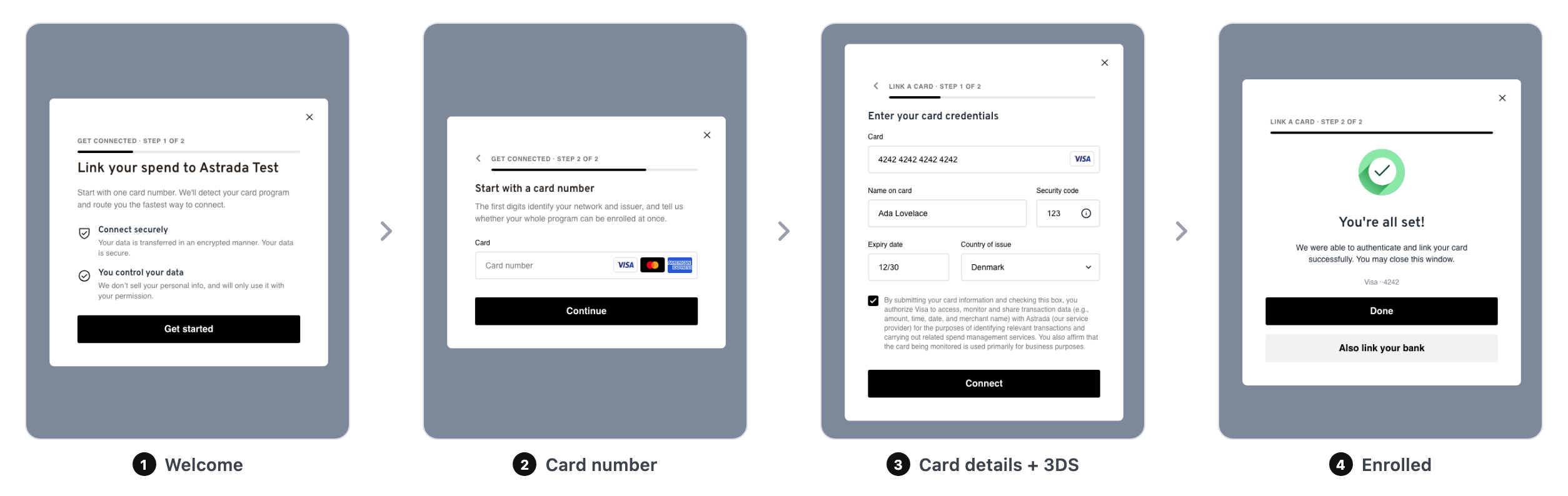
The card rail. A Visa or Mastercard enrolls with the card form and 3DS verification:
The bank rail. An American Express card links through the cardholder's bank sign-in; each credit account comes back as an enrolled card:
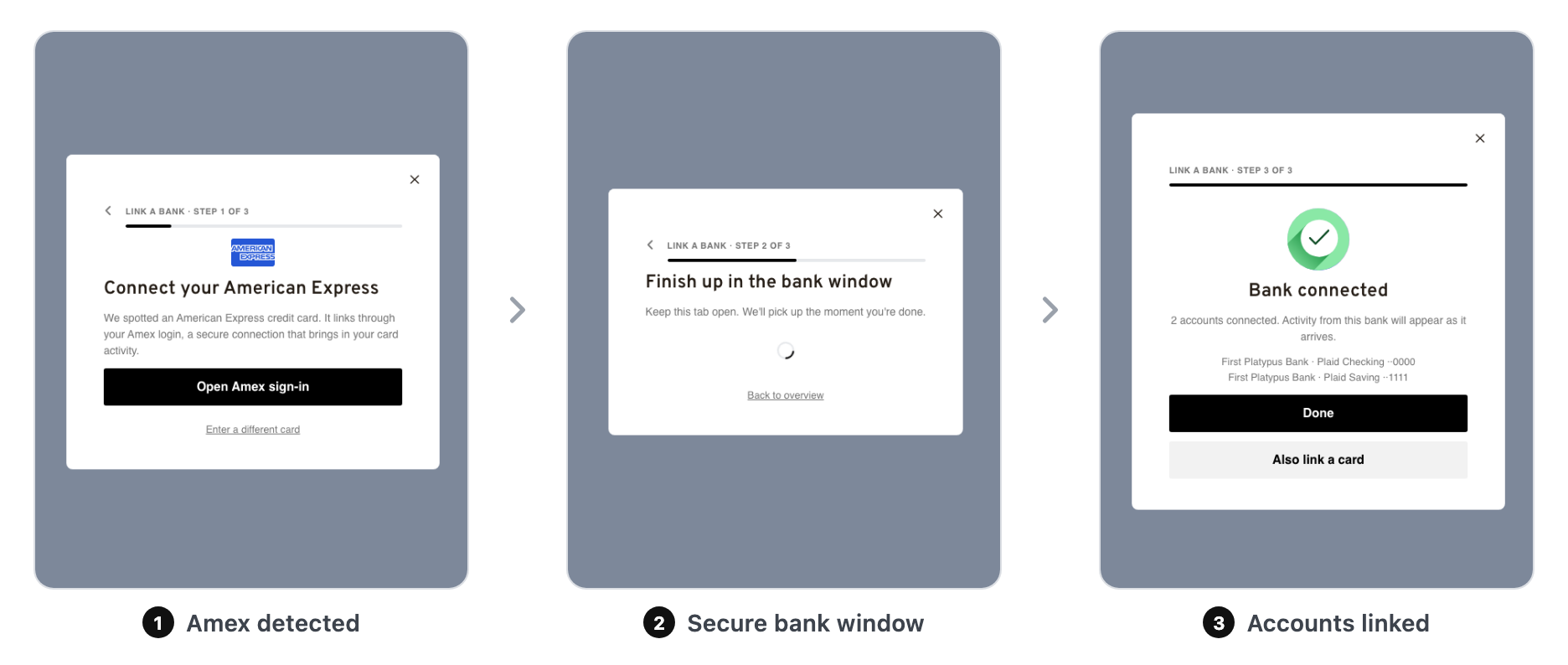
The bank sign-in window. The provider for a bank connection comes from your subaccount's bank-linking policy, or from the bankLink option on open() (see Bank Linking). With Plaid, the bank sign-in opens in a separate browser window. With Mastercard Open Finance US, Mastercard's Connect window opens inside the SDK itself, and a bank that signs its customers in on its own website opens that page in a window of its own. If Connect cannot load inside the SDK, the SDK shows a button that opens the same Connect link in a new window, so the cardholder can still finish. None of this needs code from you: the same open() call, events, and results apply to every provider.
Reconnecting a bank. To repair a linked bank account whose state is auth_required, open the SDK with reconnect: { bankAccountId }. The SDK requests a reconnect link for that account, shows the bank sign-in (for Mastercard Open Finance US, Mastercard's Connect inside the SDK), and waits until the account reads active again. It then sends bank-linked for that account. If the account doesn't need reconnecting, can't be found, or doesn't read active in time, the SDK sends error (flow: "bank") instead. Your backend can start the same repair with POST /bank-accounts/{id}/refresh; see Error States & Remediation.
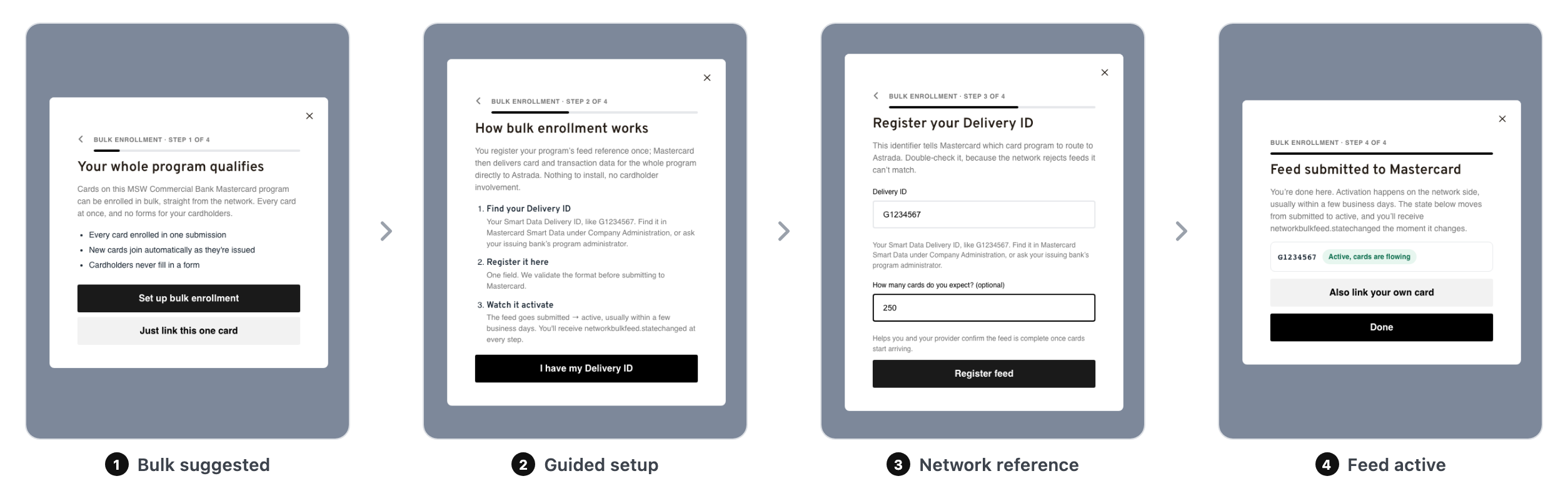
The bulk rail. When the whole program qualifies, the wizard registers a network feed once and every card on the program enrolls from network data:
The kickoff alternative. With bulkFlow: "kickoff", a bulk-capable card lands on a white-glove version of the wizard instead: a program summary (network, issuing bank, card product, issuing market), a short program form (company legal name, card program admin, optional bank contact and program size, and one consent checkbox), and an "Onboarding is underway" screen, after which Astrada contacts the bank and sets the feed up. Nobody has to obtain the network reference and type it in: when the bank issues it, register the feed yourself with POST /network-bulk-feeds and the enrollment's id, or reopen the SDK with resume so the cardholder can enter it.
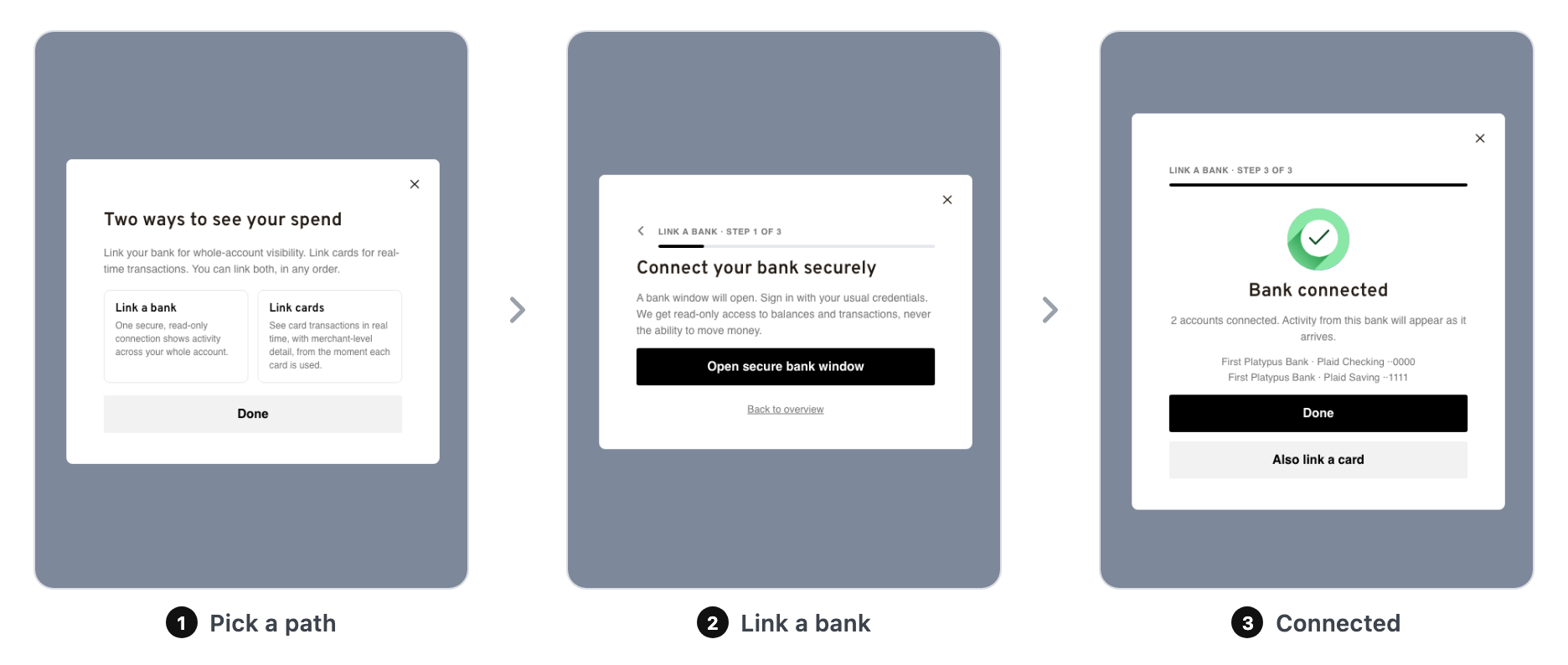
The chooser. With bank linking enabled first-class, cardholders pick their path (and can do both, in any order):
Choose your rails (server-side)
Which rails a cardholder sees is configuration, not code. Set enrollmentPolicy on the subaccount (or once on the account as a default for all subaccounts) and every SDK session for that subaccount follows it, with no client release needed.
| Field | Values | What it controls |
|---|---|---|
cardEnrollment | true / false | Manual card entry + 3DS verification. |
bankEnrollment | "off" / "amex-only" / "amex-visa" / "on" | Bank linking. on = first-class chooser tile; amex-only = reachable only via the American Express pivot from card entry; amex-visa = the Amex pivot plus the same pivot for credit Visa BINs (a temporary mode for programs whose Visa approval is pending; confirm with your Astrada contact before setting it); off = disabled (Amex cards then can't enroll unless a bulk program qualifies). |
bulkEnrollment | "off" / "suggested" / "forced" | Network bulk feeds. suggested = wizard offered with a link-just-this-card escape; forced = the wizard is the only path for bulk-capable cards; off = no bulk routing. |
linkAnotherCard | true / false | Whether the card success screen offers Link another card. Admin-managed — ask your Astrada contact to set it, or set it yourself per session with the open() option. |
Who wins when values disagreeEach field resolves independently: the subaccount value wins, then the account value, then the
open()config on the page, and finally the SDK's built-in default: card-only, everything else off. For the three rails above, server values always beat client values, so you can roll a rail out (or pull one back) from the API alone.
linkAnotherCardis the one exception — it is either-off-hides: the CTA is hidden when the server value isfalseor theopen()option isfalse, so a servertruecannot force the button back past a client opt-out. When neither side sets it, the button shows.
Write it with the same PATCH /subaccounts/{subaccountId} you already use for subaccount settings. Some ready-made shapes:
| Recipe | enrollmentPolicy | Cardholders get |
|---|---|---|
| Card-only (default) | none needed | The classic card form. |
| Card + Amex pivot | { "cardEnrollment": true, "bankEnrollment": "amex-only", "bulkEnrollment": "off" } | Card form; an Amex card automatically pivots to bank linking. |
| Everything on | { "cardEnrollment": true, "bankEnrollment": "on", "bulkEnrollment": "suggested" } | Chooser, card routing, bulk suggestions (the full picture above). |
| Bulk mandatory | { "bulkEnrollment": "forced" } | Bulk-capable programs must use the wizard (no single-card escape). |
| Bank-only | { "cardEnrollment": false, "bankEnrollment": "on", "bulkEnrollment": "off" } | Straight into bank linking; no card form at all. |
Example: enable the Amex pivot for one subaccount
PATCH https://api.astrada.co/subaccounts/{subaccountId}{
"enrollmentPolicy": {
"cardEnrollment": true,
"bankEnrollment": "amex-only",
"bulkEnrollment": "off"
}
}Example: turn everything on for a pilot subaccount
PATCH https://api.astrada.co/subaccounts/{subaccountId}{
"enrollmentPolicy": {
"cardEnrollment": true,
"bankEnrollment": "on",
"bulkEnrollment": "suggested"
}
}Example: set an account-wide default, then override one subaccount
Account-level values are configured with your Astrada contact during onboarding, and apply to every subaccount that doesn't set its own value. To opt a single subaccount out of a rail, set just that field:
PATCH https://api.astrada.co/subaccounts/{subaccountId}{
"enrollmentPolicy": {
"bulkEnrollment": "off"
}
}Absent fields leave the current value unchanged; an explicit null clears the subaccount value so the account default applies again.
Configure the session (client-side)
Everything else about a session is set per open() call:
| Option | Type | Purpose |
|---|---|---|
subaccountId | string (UUID), required | The subaccount the cardholder enrolls into. |
companyName | string, required | Your brand name in the welcome copy. |
getAccessToken | () => Promise<string>, required | Returns a bearer token minted by your backend. |
getAccessTokenTimeoutMs | number | How long the SDK waits for the token (default 5000). |
entry | "card" (default) / "choose" | Where the flow starts: card-number-first, or the chooser. |
cardEnrollment, bankEnrollment, bulkEnrollment | as above | Client-side rail preferences, applied only where the server policy doesn't set that field. |
bankLink | { provider, countryCode } | The provider for bank connections this session creates: provider is "plaid" or "mastercard", and countryCode is the bank's country (ISO 3166-1 alpha-3, e.g. "USA"). Omit it to use your subaccount's default provider, or Plaid in the USA when none is set. |
reconnect | { bankAccountId } | Open straight on reconnecting one bank account whose state is auth_required, by its id. See Reconnecting a bank under What your users see. |
bulkFlow | "reference" (default) / "kickoff" | What the bulk wizard asks of a bulk-capable card. reference = the cardholder enters the network reference their bank issued (the wizard above); kickoff = the SDK collects the program details and consent, creates a network bulk enrollment, and Astrada takes it from there with the bank (see What your users see). Applies whenever a card routes to bulk, forced included. |
resume | { networkBulkEnrollmentId, network } | Open straight on the reference step for a kickoff whose network reference has since arrived. network ("VISA" / "MASTERCARD" / "AMEX") seeds the session, so there is no card entry and no eligibility call, and the feed the cardholder registers is linked to the enrollment (feed-created then carries networkBulkEnrollmentId). Back from that step closes the session. Requires the bulk rail to be on after policy resolution; otherwise the session emits error (flow: "feed", code: "resume-unavailable") and shows the error screen. |
linkAnotherCard | boolean (default true) | Whether the card success screen offers Link another card. Set false for one-card-per-session flows; the button is then absent from the DOM, not just hidden. Combines with the server-side policy field as either-off-hides — see Choose your rails. |
statusLabels | object | Your own copy for the four verification-progress stages (see below). |
terms | { text, privacyUrl, termsUrl } | Your terms-and-conditions block on the card form. |
container | HTMLElement | Mount inline in your element instead of the full-screen modal. |
maxWidth | number | string | Maximum width of the SDK surface — a number is pixels (560 → 560px), a string is passed through ("32rem"). Modal default 480; in container mode the surface fills your element instead. |
customerReferenceId | string | Your id, echoed onto the created subscription(s). |
metadata | object | Arbitrary key/values carried with the session. |
Example: start on the chooser
UnifiedEnrollmentSdk.open({
  subaccountId: "<subaccountId>",
  companyName: "Your company",
  getAccessToken,
  entry: "choose", // honored when more than one rail is enabled
});
Example: mount inline instead of the modal
UnifiedEnrollmentSdk.open({
  subaccountId: "<subaccountId>",
  companyName: "Your company",
  getAccessToken,
  container: document.getElementById("enrollment-panel"),
});
The iframe fills the container; close() removes the iframe but leaves your element in place.
Example: one card per session
If your own UI already has an "add another card" entry point, turn the SDK's off so the success screen ends the session:
UnifiedEnrollmentSdk.open({
  subaccountId: "<subaccountId>",
  companyName: "Your company",
  getAccessToken,
  bulkEnrollment: false,
  linkAnotherCard: false,
  maxWidth: 560,
});
Two things worth knowing. linkAnotherCard must be a real boolean — any other value is rejected outright, and open() returns false without opening the SDK at all, so "false" as a string fails silently from the user's point of view. And it gates the direct-flow button only: in a session that shows the chooser, or one where the bank rail is on and no bank is linked yet, the success screen offers that next step instead and linkAnotherCard does not remove it.
Migrating from the legacy boolean bulkEnrollment flag
The legacy client flag still works and maps to the tri-state model: bulkEnrollment: false behaves as { cardEnrollment: true, bankEnrollment: "amex-only", bulkEnrollment: "off" } (direct card form with the Amex pivot), and bulkEnrollment: true behaves as { cardEnrollment: true, bankEnrollment: "on", bulkEnrollment: "suggested" } (routed flow with the chooser). Explicit tri-state fields override the mapping field by field.
Make it yours
setStyle({ colors }) themes the SDK with CSS color values. Call it before or after open(), and it sticks across sessions:
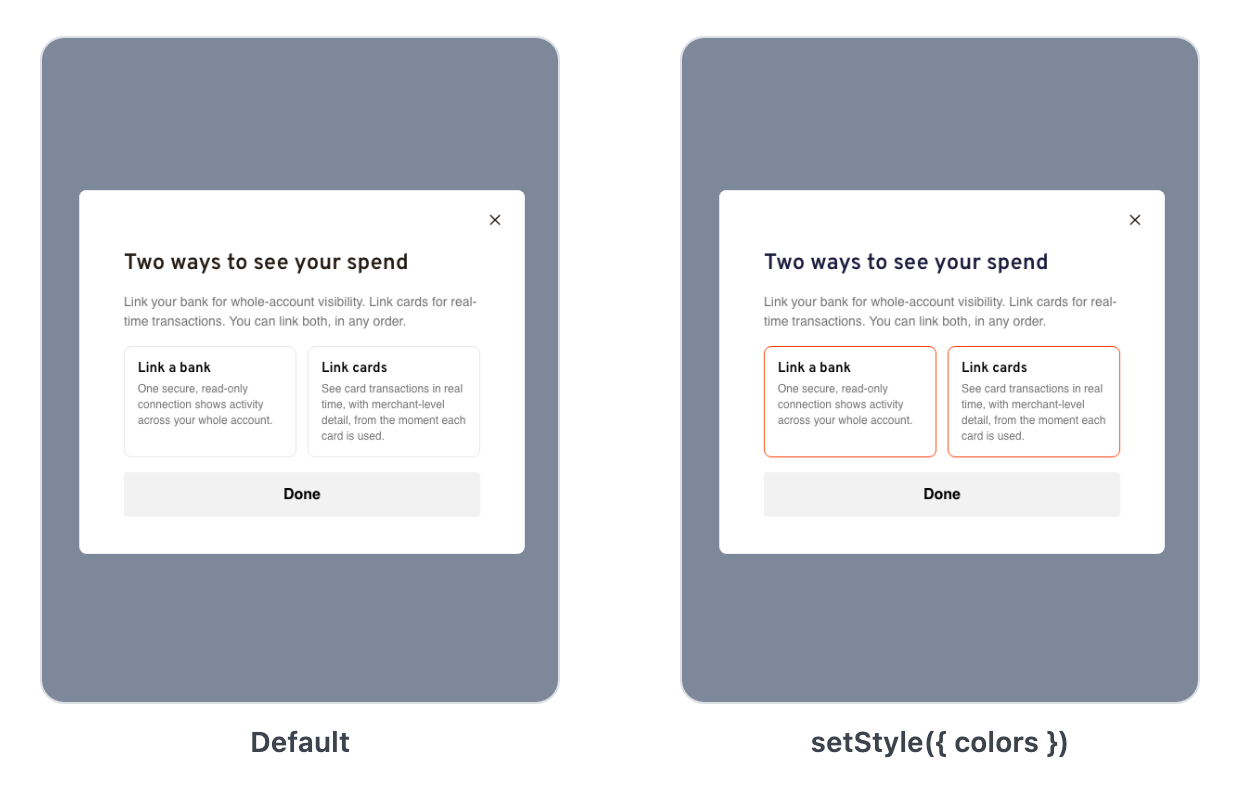
UnifiedEnrollmentSdk.setStyle({
  colors: {
    "--btn-primary-bg-color": "#FD4308",
    "--headline-color": "#1C1C3F",
    "--progress-bar-color": "#FD4308",
    "--tile-border-color": "#FD4308",
  },
});| Variable | Themes |
|---|---|
--btn-primary-bg-color | Primary buttons (and derived accents). |
--headline-color | Screen headlines. |
--caption-color | Subheads and captions. |
--progress-bar-color / --progress-track-color | The step progress bar fill / track. |
--tile-bg-color / --tile-border-color | The chooser tiles. |
--overlay-bg-color | The backdrop behind the dialog. |
--input-color / --input-placeholder-color | Form input text / placeholder. |
--input-border-color / --input-border-color--error | Input borders, normal / error. |
--checkbox-bg-color--checked | Checked consent checkboxes. |
--terms-link-color | Links in the terms copy. |
Status-chip variables (bulk feed and bank states)
| Variable | Themes |
|---|---|
--chip-success-bg-color / --chip-success-color | Success chips (e.g. "Active, cards are flowing"). |
--chip-warning-bg-color / --chip-warning-color | Warning chips. |
--chip-error-bg-color / --chip-error-color | Error chips. |
--chip-neutral-bg-color / --chip-neutral-color | Neutral chips. |
The bank sign-in (Plaid's window or Mastercard's Connect) and the 3DS challenge pages belong to the provider, the bank, and the network, so setStyle can't theme them.
statusLabels replaces the copy on the four card-verification progress stages:
| Key | Default label |
|---|---|
creatingSubscription | "Securely connecting your card" |
startingVerification | "Contacting your bank" |
verifying | "Verifying with your bank" |
finishing | "Finalizing your enrollment" |
Listen for results
onEvent is the primary callback and fires for every event as it happens. onSuccess, onError, onCancel, and onConnect are convenience callbacks layered on top:
onEventandonSuccessmirror this session; they are not your system of recordBoth callbacks reflect what happens inside the confirm window this browser session runs after the cardholder finishes, and if a bank connection's result lands after that window closes, the session can end without ever reporting the card it went on to create. The durable record is server-side:
cardsubscription.createdfires for every minted bank-feed card, andbanklink.completedfires for the connection. Wire those webhooks as your source of truth, the same way the bulk rail's live state defers tonetworkbulkfeed.statechangedrather than the SDK session.
| Callback | Fires | Payload |
|---|---|---|
onEvent(event) | every event, as it happens | a discriminated union: card-enrolled (one per card), bank-linked, feed-created, bulk-enrollment-requested, error, closed, cancelled |
onSuccess(result) | once, when the session closes with at least one completed action (a kickoff request counts as one) | { cards, bankAccounts, bankLinks, bulkFeeds, bulkEnrollments, summary }: every object created this session, keyed by id |
onError(data) | on an error, without closing the session | { type: "error", flow, code, message, verificationId?, cardId?, subscriptionId? } |
onCancel() | only when the session closes with nothing enrolled | none |
onConnect() | the cardholder submits the card form (card flow only) | none |
The consolidated result: onSuccess
onSuccessonSuccess fires once, at close, with a map of everything the session created. Objects are grouped by type and keyed by id, so you can assign each one to your cardholder in a single pass. Types the session didn't touch come back as an empty {}.
onSuccess({
  cards: {
    // keyed by cardId
    "cd_9f3a1c72": {
      cardId: "cd_9f3a1c72",
      subscriptionId: "cs_71bdea02",
      enrollmentType: "bank-feed",     // "cardholder-single" | "bank-feed"
      scheme: "AMEX",
      last4: "1008",
      bankAccountId: "ba_88ff10d2",    // present on bank-feed cards
      // typed cards also carry expiryMonth, expiryYear, cardholderName,
      // country, and issuerName (when the eligibility lookup ran)
    },
  },
  bankAccounts: {
    // keyed by account id
    "ba_88ff10d2": {
      id: "ba_88ff10d2", name: "Amex Platinum", mask: "1008",
      institutionName: "American Express", type: "credit",
      cardIds: ["cd_9f3a1c72"],
    },
  },
  bankLinks: { "bl_3c2e6f90": { id: "bl_3c2e6f90" } },
  bulkFeeds: {},   // network bulk feeds, when the session registered any
  bulkEnrollments: {},   // kickoff requests, when the session made any (bulkFlow: "kickoff")
  summary: { cardsEnrolled: 1, banksLinked: 1, feedsCreated: 0, enrollmentsRequested: 0 },
});| Key | Contains |
|---|---|
cards | Every card enrolled or materialized this session, keyed by cardId. Each carries the same card fields as the card-enrolled event below (typed cards include expiry, name, and country). Two event-only fields, enrollmentGuidance and authenticationFlow, are not in this map. Capture them from the card-enrolled event. |
bankAccounts | Every connected bank account, keyed by account id, with the same fields as the bank-linked event's accounts. |
bankLinks | Each completed bank connection, keyed by bankLinkId: { id }. |
bulkFeeds | Each registered network feed, keyed by feedId, with the same fields as the feed-created event. |
bulkEnrollments | Each kickoff request submitted this session, keyed by enrollmentId, with the same fields as the bulk-enrollment-requested event. |
summary | Session counts: { cardsEnrolled, banksLinked, feedsCreated, enrollmentsRequested }. |
Objects cross-reference by id: a bank-feed card's bankAccountId keys into bankAccounts, whose cardIds link back. Store cardId as your durable key and assign it right away: the card exists before its first transaction on every rail.
Migrating from the Card Enrollment SDK?The legacy SDK's
onSuccesshanded you a single card (data.cardId/data.subscriptionId). The unified SDK returns a map: iterateObject.values(result.cards)rather than readingdata.cardId. Your webhook and REST handling is otherwise unchanged.
Streaming events: onEvent
onEventUse onEvent to react to each action the moment it completes, rather than waiting for the session to close:
onEvent: (event) => {
  switch (event.type) {
    case "card-enrolled":   // one per card, on every rail
      assignCardToCardholder(event.cardId);
      break;
    case "bank-linked":     // a bank connection completed
      break;
    case "feed-created":    // a network bulk feed was registered
      break;
    case "bulk-enrollment-requested": // a kickoff was submitted; Astrada takes it from here
      break;
    case "closed":          // session closed; carries the same maps onSuccess gets
    case "cancelled":       // session closed with nothing enrolled
      break;
  }
};
A host listening on onEvent also receives closed (with the same maps onSuccess gets), so pick one as your terminal signal to avoid double-counting.
card-enrolled: example and fields
One per card, on every rail:
{
  "type": "card-enrolled",
  "cardId": "cd_9f3a1c72",
  "subscriptionId": "cs_71bdea02",
  "enrollmentType": "cardholder-single",
  "scheme": "VISA",
  "last4": "4242",
  "expiryMonth": 12,
  "expiryYear": 2030,
  "cardholderName": "Ada Lovelace",
  "country": "DNK",
  "issuerName": "Example Bank",
  "authenticationFlow": "frictionless"
}| Field | Type | Meaning |
|---|---|---|
cardId | string | The durable card id. Store this and assign it to your cardholder. |
subscriptionId | string, optional | The card subscription created for it, present on every rail including bank-feed mints. |
enrollmentType | "cardholder-single" / "bank-feed" | How the card enrolled: typed and 3DS-verified, or materialized from a bank connection. |
scheme | "VISA" / "MASTERCARD" / "AMEX", optional | Card network. |
last4, expiryMonth, expiryYear, cardholderName, country | string / number, optional | Display details derived client-side from the form the SDK holds. The PAN never reaches your page. |
issuerName | string, optional | Issuing bank, from the BIN lookup when the routed flow ran. |
bankAccountId | string, optional | On bank-feed cards: the bank account the card came from (keys into bankAccounts). |
authenticationFlow | "challenge" / "frictionless" / null | Whether 3DS required a cardholder challenge. |
enrollmentGuidance | object, optional | Advisory only: availableEnrollmentMethods the card's program supports. |
scheme, last4 | n/a | REST and webhook payloads use different names for the same data: scheme here is network there, and last4 here is last4digits on a bank account's cards[] entries (or mask on the account itself). Correlate across surfaces on cardId, which is consistent everywhere. |
bank-linked: example and fields
Fires when a bank connection completes, carrying every connected account:
{
  "type": "bank-linked",
  "bankLinkId": "bl_3c2e6f90",
  "bankAccounts": [
    {
      "id": "ba_88ff10d2",
      "name": "Platinum Card",
      "mask": "1008",
      "institutionName": "American Express",
      "type": "credit",
      "cardIds": ["cd_9f3a1c72"]
    }
  ]
}| Field | Type | Meaning |
|---|---|---|
bankLinkId | string | The completed bank connection, one per sign-in. |
bankAccounts[].id | string | The bank account id (keys into onSuccess.bankAccounts). |
bankAccounts[].name | string | The account's display name from the institution. |
bankAccounts[].mask | string, optional | Last 4 of the account number; for credit accounts, the card's last 4. |
bankAccounts[].institutionName | string, optional | The institution, e.g. "American Express". |
bankAccounts[].type | string, optional | Account type, e.g. "credit". |
bankAccounts[].cardIds | string[], optional | Cards linked to this account, including any card the connection just created (its cardId appears here AND in the top-level cards map); pre-existing cards match by mask, at completion and by a scheduled sweep every few hours. |
Note the split: bank-linked announces the connection and its accounts; the cards a connection produces each arrive as their own card-enrolled event (with enrollmentType: "bank-feed"). The REST and webhook bank account object also carries a cards[] field (created cards, split out from cardIds); the SDK flattens that instead, surfacing every created card once in the top-level onSuccess.cards map, keyed by cardId with enrollmentType: "bank-feed" and bankAccountId pointing back here.
feed-created: example and fields
Fires when a network bulk feed is registered. Re-registering an existing feed is an idempotent success: the event fires with the existing feed's id and current state.
{
  "type": "feed-created",
  "feedId": "nbf_5b8d2f11",
  "network": "MASTERCARD",
  "networkReference": "G1234567",
  "state": "submitted",
  "binInfo": {
    "issuerName": "Example Bank",
    "issuerCountry": "USA",
    "type": "COMMERCIAL",
    "fundingType": "CREDIT"
  }
}| Field | Type | Meaning |
|---|---|---|
feedId | string | The registered network bulk feed. |
network | "VISA" / "MASTERCARD" / "AMEX" | Which network delivers the feed. |
networkReference | string | The program reference that was registered (Mastercard Delivery ID, Visa RPIC/PIC, …). |
state | string | Feed lifecycle state. Activation happens on the network side, usually within a few business days. Watch the networkbulkfeed.statechanged webhook rather than the SDK session. |
binInfo | object, optional | Card metadata for the program BIN, resolved server-side by the eligibility check, so it arrives without the cards:read scope. Present only when the issuer name is known; the other fields are best-effort and may be omitted. |
binInfo.issuerName | string | Issuing bank. |
binInfo.issuerCountry | string, optional | Issuing bank's country, ISO 3166-1 alpha-3 (e.g. "USA"). |
binInfo.type | "COMMERCIAL" / "CORPORATE" / "CONSUMER" / "SMALL_BUSINESS", optional | Card type. |
binInfo.fundingType | "CREDIT" / "DEBIT" / "PREPAID", optional | How the card is funded. |
networkBulkEnrollmentId | string, optional | The kickoff enrollment this feed fulfils. Present when the session was opened with resume. |
bulk-enrollment-requested: example and fields
Fires once the kickoff wizard's program form is submitted and Astrada has recorded the request (bulkFlow: "kickoff" only). Nothing is enrolled yet: from here the work happens between Astrada and the bank, and the cards arrive once the feed is registered and activates, announced by cardsubscription.created exactly as on the reference flow.
{
  "type": "bulk-enrollment-requested",
  "enrollmentId": "9c1f0c4e-2f0e-4a9c-9a1b-0c1d2e3f4a5b",
  "subaccountId": "24c4f90d-ab3b-4f6e-8a1d-d251a4fcf34c",
  "network": "MASTERCARD",
  "issuerName": "Jack Henry And Associates",
  "issuerCountry": "USA",
  "cardType": "COMMERCIAL",
  "fundingType": "CREDIT",
  "outreach": "astrada",
  "companyLegalName": "Vertex Industries, Inc.",
  "cardAdminEmail": "[email protected]",
  "cardCountBand": "251-1000",
  "customerReferenceId": "outpave-customer-8842"
}| Field | Type | Meaning |
|---|---|---|
enrollmentId | string | The network bulk enrollment Astrada created. Store it: you pass it as networkBulkEnrollmentId when you register the feed with POST /network-bulk-feeds, or in resume to let the cardholder enter the reference in the SDK. Readable any time with GET /network-bulk-enrollments/{networkBulkEnrollmentId}. |
subaccountId | string | The subaccount the program enrolls into. |
network | "VISA" / "MASTERCARD" / "AMEX" | The program's network. |
issuerName, issuerCountry, cardType, fundingType | string, optional | The issuer details the wizard showed, from the BIN lookup. issuerCountry is ISO 3166 alpha-3. |
outreach | "astrada" / "self" | Who contacts the bank: Astrada, or the cardholder's company themselves (copying [email protected]). |
companyLegalName | string | The company's legal name as entered on the form. |
cardAdminEmail | string | The card program admin's email. Onboarding updates go there. |
cardCountBand | string, optional | The estimated program size: "1-50", "51-250", "251-1000", "1001-5000", "5001-25000", or "25000+". |
customerReferenceId | string, optional | Your id from the open() config, echoed back. |
error: example and fields
Errors don't close the session. The cardholder can retry or pick another path, and you get the event for logging or support:
{
  "type": "error",
  "flow": "card",
  "code": "verification_failed",
  "message": "The card could not be verified.",
  "verificationId": "cv_0f52ab90",
  "cardId": "cd_9f3a1c72",
  "subscriptionId": "cs_71bdea02"
}| Field | Type | Meaning |
|---|---|---|
flow | "card" / "bank" / "feed" / "session" | Which rail (or the session itself) the error happened in. |
code | string | Stable, machine-readable reason. |
message | string | Human-readable description. Display or log it, don't parse it. |
verificationId | string, optional | The 3DS verification, when the card flow got that far. Quote it when contacting support. |
cardId, subscriptionId | string, optional | Present when the flow had already created them. |
In the bank flow (flow: "bank"), the SDK also sends error when Mastercard's Connect can't load inside the SDK and the browser blocks the new window from the fallback button too. A manual link to the bank sign-in stays on screen, so the cardholder can still finish.
What you get back, per rail
Whatever rail a card takes, it lands in the same place: a durable cardId, a card subscription announced by cardsubscription.created, and transactions that carry the cardId. The only per-rail difference is the subscription's enrollmentType (cardholder-single, bank-feed, or network-bulk) and its back-reference (bankAccountId or networkBulkFeedId). Handle enrollment once and read enrollmentType as a label, never as a branch. See Unified Card & Bank Feeds and Webhook Event Types.
Supported browsers
The embedded app targets es2020-era engines: Chrome/Edge 88+, Firefox 78+, Safari 14+. The loader script itself compiles lower (es2017) since it executes on your page. Button hover shading uses color-mix() and degrades gracefully on older engines. Cross-engine coverage (WebKit and Firefox, including the bank-window popup flow and the embedded Mastercard Connect window) runs in the SDK's test suite.
Availability
The unified SDK is in preview. Card-number enrollment is available today; the bank-connection and bulk rails are enabled per account. Talk to your Astrada contact before integrating.
Related
- Unified Card & Bank Feeds: the shared card model across every rail.
- Quick Start: Bank Linking: the bank-connection flow end to end.
- Account & Subaccount Configuration: the wider configuration model.
- Webhook Event Types: the canonical event catalog.
Updated 9 days ago