
Configuration
Every option open() takes in SDK v2, which value wins between subaccount policy and open(), the consent and terms boxes, and hosted enrollment links.
Options
open() checks every option before it opens anything. A value it refuses logs an error naming the field, and open() resolves false and opens nothing; an option it ignores or a value it adjusts logs a warning, and the session opens. "Same" in the table means as in SDK v1.
| Option | In v2 |
|---|---|
persona | New, and required. "admin" or "cardholder". Set it from who is on the page; the SDK never asks. A missing or other value is refused. |
locale | New. The language of the screens, as a BCP 47 tag such as "en-GB"; the language part decides. The screens are in English. sv-SE is available on request; contact Astrada. |
prefill | New. Optional. { companyLegalName?, adminName?, adminEmail?, bankContactName?, bankContactEmail? }, all strings. Fills in the bulk kickoff form and the confirm-request form with details your page already knows. |
logo | New. { pngBase64 }: your logo beside Astrada's mark at the top of the card, on every screen, 28 pixels tall. Without it, Astrada's mark shows alone. |
entry | Ignored, with a warning whatever its value; there is no chooser. |
bulkFlow | Ignored, with a warning whatever its value. The kickoff is the only bulk flow (resume still opens the reference step). |
minBinDigits | Now 8 to 11 (default 8), and always used: it sets how many digits Continue needs on the card number screen. v1 took 6 to 16, and only with card enrollment off. Values outside the range are clamped, with a warning. |
bulkEnrollment | Same values. "suggested" and "forced" act through the program screen and the callout; "forced" drops Connect this card now. |
bankEnrollment | Same values. "on" no longer adds a chooser tile: the bank link is a route after the card number, on admin pages, and on employee pages for an Amex card. |
linkAnotherCard | Same type. It shows or hides Connect another company card on the card success screen, which starts again on the page's first screen: the card number screen on an admin page, the empty card form on an employee page. |
bankLink | Same shape. When the page sends no countryCode, v2 sends the card issuer's country. An unknown field or a bad value is refused. |
maxWidth | Same type, now at least 360 pixels: a smaller number becomes 360 with a warning. |
getAccessTokenTimeoutMs | Same meaning. The enrollment window waits for it too, so a slow token gets the time you set. It must be a positive number; anything else is refused. |
resume | Same shape. On a cardholder page it is ignored with a warning, and the session opens as any session on that page does. An unknown field is refused. |
reconnect | Same shape. An unknown field is refused. |
statusLabels | Same shape. An unknown stage, or a label that is not a string, is refused. |
customerReferenceId | Same meaning, and it must be a UUID: the API takes a UUID only, so anything else is refused. |
terms | Same shape. text renders as text, where a Markdown link becomes a link, and links open only for https, http and mailto URLs. Without terms, the form shows no terms box (see Consent and the terms box). |
metadata | Still reserved. v2 logs a warning that it does nothing, whatever its value, and sends it nowhere. |
More on locale, prefill, logo, bulkEnrollment, linkAnotherCard and terms:
locale: without a supportedlocalethe screens are in English, whatever language the browser prefers. Another language shows English, with a warning. The hosted link pages take nolocaleand are in English.prefill: the admin sees each value and can change it, and nothing is sent until they submit. An unknown field or a non-string value is refused.logo:pngBase64is the bytes of a PNG file in base64, with nodata:prefix and never a URL, at most 512 x 512 pixels and 32 KB. Anything else is refused, and the error says why.bulkEnrollment: the v1trueorfalsestill works, with a warning naming what it sets:trueis bulk"suggested"with the bank step"on";falseis bulk"off"with the bank step"amex-only";- and both turn the card form on, except for a
cardEnrollmentorbankEnrollmentyou pass yourself.
linkAnotherCard: a hosted link session never shows it, whatever this is set to.terms: a non-stringtext, a javascript:, data: or vbscript: URL, or an unknown field is refused.
Unchanged: subaccountId, companyName, getAccessToken, container, cardEnrollment, and the five callbacks.
An employee page sets persona: "cardholder":
UnifiedEnrollmentSdk.open({
  subaccountId: "<subaccountId>",
  companyName: "Your company",
  getAccessToken,
  persona: "cardholder",
});
Which value wins: subaccount policy or open() option
open() optionEach rail has a server field on the subaccount's enrollmentPolicy and an option in open(). The SDK picks one field at a time, in this order: the subaccount's value, then the account's value, then the open() option, then the default.
| Setting | Server field (PATCH /subaccounts/{subaccountId}) | open() option | Default | Who wins |
|---|---|---|---|---|
| Card form | enrollmentPolicy.cardEnrollment | cardEnrollment | true | The subaccount, then the account, then open() |
| Bank link | enrollmentPolicy.bankEnrollment | bankEnrollment | "off" | The subaccount, then the account, then open() |
| Bulk | enrollmentPolicy.bulkEnrollment | bulkEnrollment | "off" | The subaccount, then the account, then open() |
| Connect another company card | Not set through PATCH (Astrada manages it; the subaccount read shows the effective value) | linkAnotherCard | true | false on either side hides the button; nothing can turn it on against false |
A rail the subaccount leaves unset (or clears with null) takes the account's value when there is one, then your open() option. Two exceptions to the order:
- While Astrada has locked the account's bank link value (
bankEnrollmentLocked: trueon the subaccount read, read-only), that value applies whatever the subaccount oropen()says. - An account
bankEnrollmentof"amex-visa"applies to every subaccount the same way.
route-decided reports where each field came from in provenance. When a rail's stored value and your open() option disagree, the SDK uses the stored value and logs a console warning, once per page load, that names each such rail with both values.
A policy change reaches the next session you open. If the same tab ran the SDK in the last 5 minutes, that session can start from the policy it read then; the new policy takes over on the card-number screen (on an employee page, the card form while nothing is typed in it), and a session already past that screen switches when it gets back there.
Consent and the terms box
The SDK sends the consent record with each card enrollment, including from hosted enrollment link pages, so you write no code for it. What it shows on a consent error and what it records: The consent record.
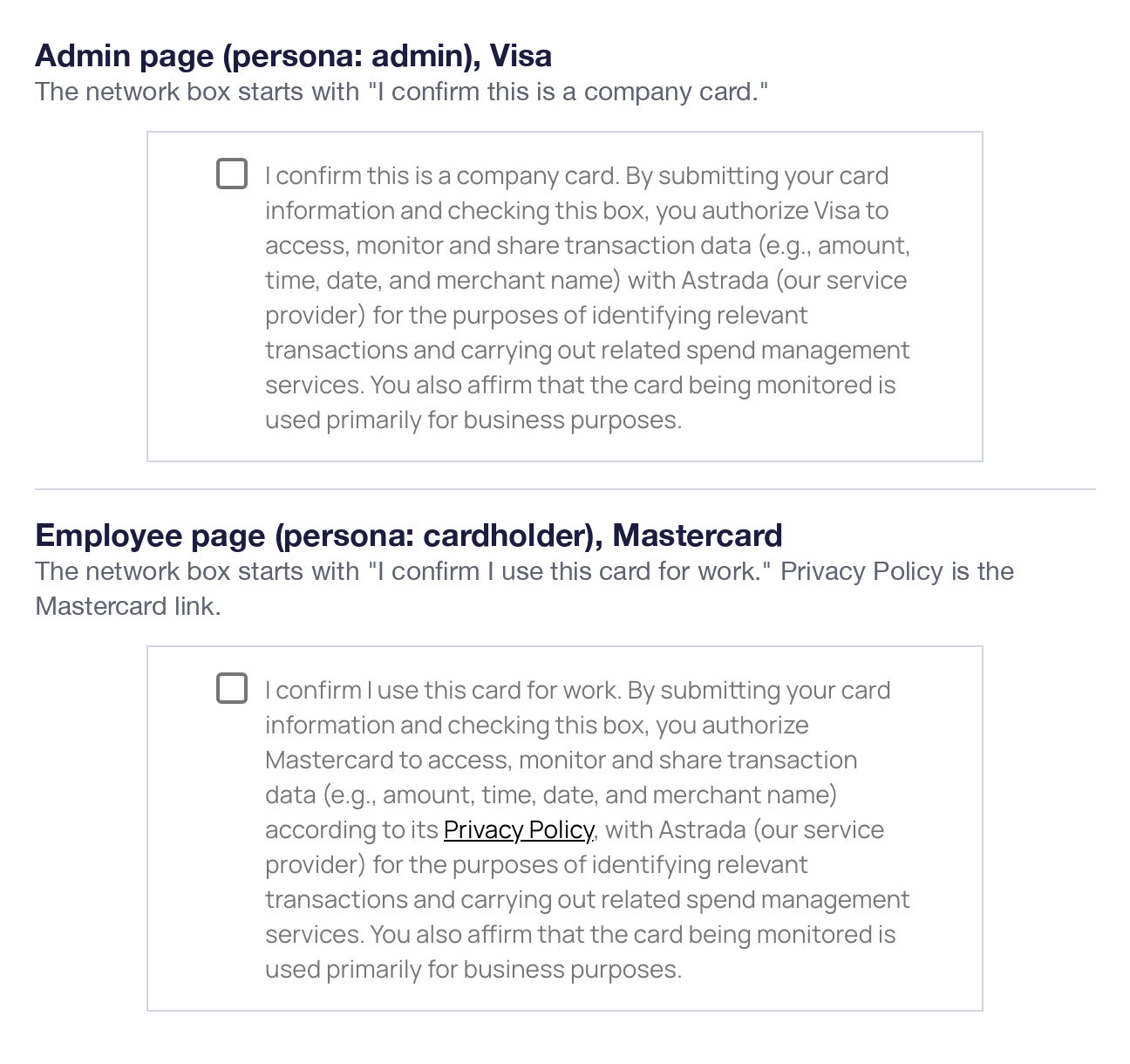
Admin and employee pages open the network box with different sentences.
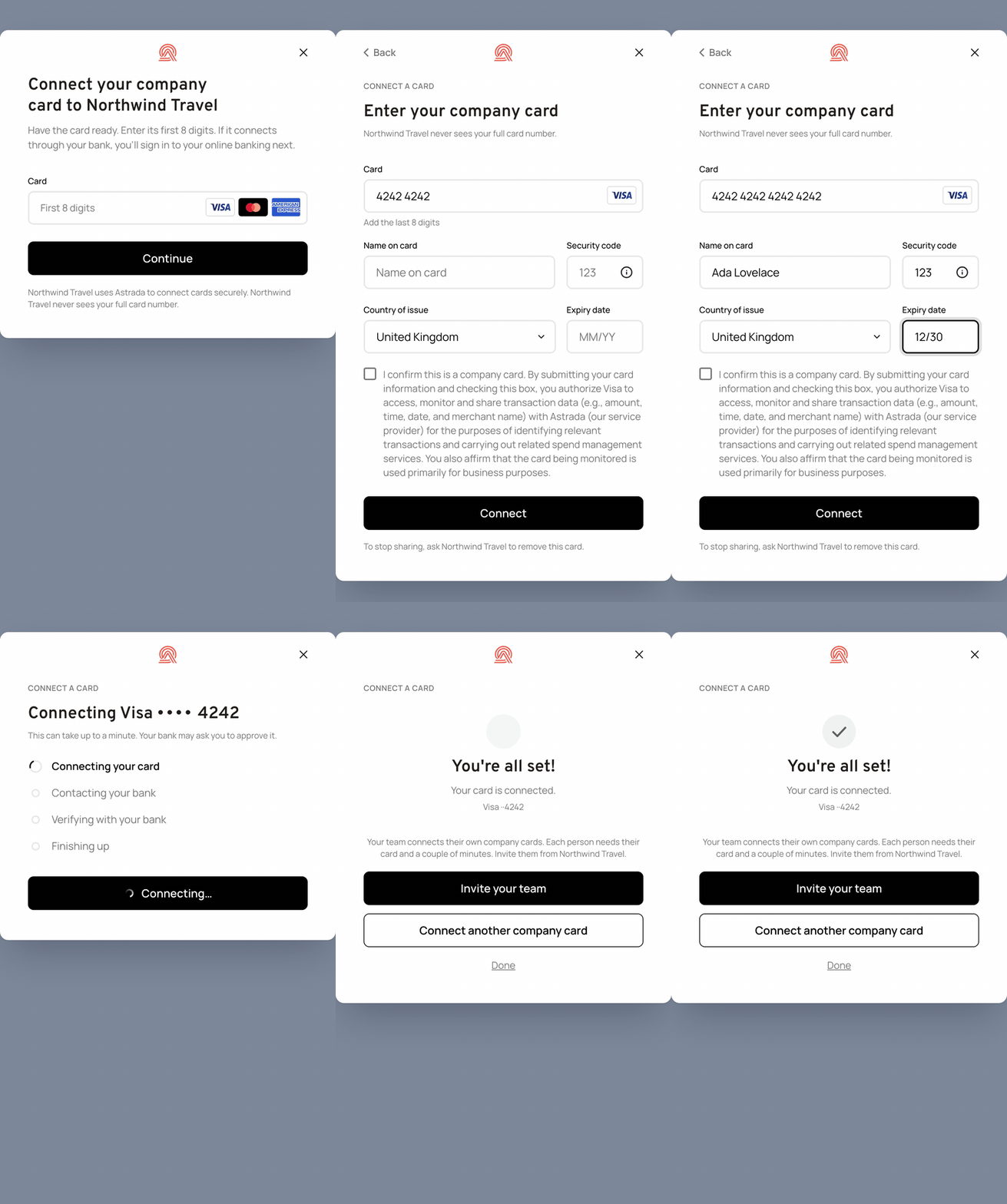
Tick, connect, success (16 s).
Enrollment links and hosted pages
An enrollment link lets people connect their own cards on a page Astrada hosts, so you need no SDK page of your own for them. A link opens one subaccount, and every card enrolled through it joins that subaccount. Astrada switches enrollment links on per account; until then the endpoints below answer 409 with ENROLLMENT_LINKS_NOT_ENABLED.
Your backend creates the link and hears what was enrolled:
sequenceDiagram
    autonumber
    participant B as Your backend
    participant A as Astrada API
    participant E as Employee
    B->>A: POST /enrollment-links {subaccountId, kind}
    A-->>B: 201 {id, url}, the only copy of the secret
    B->>E: Send the url
    Note over E: Uses the link (next diagram)
    A-->>B: cardsubscription.created webhook
    B->>A: GET /enrollment-links/{id}
The person uses the link on the hosted page:
sequenceDiagram
    autonumber
    participant E as Employee
    participant H as Hosted page
    participant A as Astrada API
    E->>H: Opens the link (enroll.html)
    H->>A: POST /enrollment-link-sessions/preview
    A-->>H: Platform, employer, brand
    E->>H: Get started (team link: Turnstile)
    H->>A: POST /enrollment-link-sessions
    A-->>H: Session, 300 s card token
    E->>H: Ticks consent box, submits card
    H->>A: Card enrollment calls, with consent
    H->>A: POST /enrollment-link-sessions/complete
There are two kinds of link:
- Personal link. One link for one employee.
- Your backend creates it with
POST /enrollment-links,kind: "cardholder"and your API client. ThecustomerReferenceIdyou send (a UUID, such as the employee it is for) is carried by every card enrolled through the link. - A personal link is used up by the first session that completes something, and allows at most 5 session starts before that.
- It expires after 7 days unless you set
expiresInHours.
- Your backend creates it with
- Team link. One link to share with a team.
- Your backend creates it with
POST /enrollment-linksandkind: "team"(14 days and 50 session starts by default,maxUsesup to 500), or the SDK creates it withPOST /subaccounts/{subaccountId}/team-linkwhen an admin presses Invite your team on an ending: the admin sees a link to copy. - A session that ends from Invite your team always ends with
next: "invite-team"ononSuccessand on theclosedevent: right away when enrollment links are off for the account, from Done on the link screen, or when the link can't be made.teamLink({ id, url, expiresAt }) comes with it only when a link was made. - A page with
bulkEnrollment: "forced"never offers Invite your team.
- Your backend creates it with
What the person sees
Link pages carry card enrollment only: no bulk enrollment and no bank step. A person who opens a working link goes through these screens:
- The start page. The link opens
enroll.htmlunder/unified/v2/on the SDK host (sdk.astrada.co, orsdk.sandbox.astrada.coin sandbox), with the link's secret after#. The page strips the secret from the address before it makes any request.- It names your platform and the employer from the link's
platformNameandorganizationName; once Astrada has set a brand profile for your account, it shows your name, accent color and logo instead of the plain Astrada header. The brand shows once, in the page header. - The consent text is Astrada's.
- It names your platform and the employer from the link's
- Get started. The person presses Get started. A team link also asks the person to pass a Cloudflare Turnstile check first.
- The card form. The page runs the SDK as an employee page (
persona: "cardholder") for the link's subaccount, so it opens on the card form. The card form's heading is the page's only heading. Because a link cannot pass terms, the card form shows only the network consent box. - "You're done". The page's "You're done" is its one ending: the SDK's success screen closes as it opens, because a link session never offers Connect another company card and the screen has nothing but Done.
Before you create links
POST /enrollment-linksneedssubaccounts:write, so call it from your backend with your API client, never from a browser token.POST /subaccounts/{subaccountId}/team-linktakes the SDK token'scard-subscriptions:write, or an API client'ssubaccounts:write.- Both calls answer
409withCARD_ENROLLMENT_OFFwhen card enrollment is off on the subaccount (enrollmentPolicy.cardEnrollmentisfalse), because the hosted page has nothing else to offer. - Both calls answer
429withRATE_LIMITEDonce your account has created 2,000 links in a UTC day, team links included.POST /subaccounts/{subaccountId}/team-linkalso stops at 20 links a day for one subaccount. POST /subaccounts/{subaccountId}/team-linkmakes a new link on every call. A new link does not revoke an older one, so a link an admin already shared keeps working when they press Invite your team again. Each link ends at its own expiry, when its session starts are used up, or when it is revoked.- The response's
urlis the only place the secret is returned. Store or send it then; later reads such asGET /enrollment-links/{linkId}do not show it.POST /enrollment-links/{linkId}/revokeends a link. - A session lasts 60 minutes;
GET /enrollment-links/{linkId}lists each session with the ids the page reported. Thecardsubscriptionwebhooks stay the source of truth for what was enrolled.
Updated about 1 hour ago